
How to receive Pay-Per-View payouts
Overview
This article explains where to view Pay-Per-View (PPV) payments and purchaser information, how payout timing works, and how to request a payout for PPV revenue.
This article applies to PPV payments processed through EasyPay, Lightcast’s integrated payment service. If you use a different payment provider, payout procedures and requirements may differ.
For more information about PPV payment processing, see How MULTIFY and EasyPay work for Pay-Per-View.
Prerequisites
Before requesting a Pay-Per-View payout, make sure:
Your PPV service has been configured by Lightcast and uses EasyPay for payment processing.
You have access to your Crosstribution payout portal at www.crosstribution.com.
You have submitted the tax documentation required for your account.
You have an eligible payout method set up.
You have an available payout balance following the 30-day clearance period.
Note: If you have not yet submitted the required tax documentation or need assistance setting up your payout method, contact Customer Support.
How it works
Where to view and manage your PPV revenue
Your Crosstribution account at www.crosstribution.com is your central portal for accessing information related to your subscribers, revenue, and monetization payouts.
For PPV, you can use your Crosstribution account to review payment and purchaser information, monitor your available payout balance, and request payouts for eligible PPV revenue.
For step-by-step guidance on accessing PPV payment information and requesting payouts, see the Instructions section below.
With EasyPay, publishers receive 80% of PPV payments. Lightcast retains 20% to cover payment processing and operating costs associated with EasyPay.
For example:
Description | Amount |
|---|---|
PPV ticket price | $20.00 |
Publisher revenue (80%) | $16.00 |
Lightcast revenue share (20%) | $4.00 |
The publisher’s share becomes eligible for payout after the 30-day clearance period, subject to any applicable refunds or chargebacks.
Payout timing
PPV payments become eligible for payout after a 30-day clearance period, provided the payments have been successfully processed and have not been refunded or reversed.
The clearance period allows time for payment verification, refund requests, and the identification of potentially unauthorized transactions.
Once the 30-day clearance period has passed, eligible payments are reflected in your available payout balance.
Important: Your total PPV sales may be higher than your available payout balance due to payments that are still within the clearance period, EasyPay revenue share, refunds, or chargebacks.
Refunds and chargebacks
Refunds
Each publisher determines their own refund policy and decides whether a PPV refund request should be approved.
Lightcast’s Accounting team can issue a refund when:
The publisher provides written approval for the refund.
The applicable PPV revenue has not already been paid out to the publisher.
If the applicable revenue has already been paid out, the publisher is responsible for handling the refund directly with the purchaser.
Any refund issued before payout reduces the applicable PPV revenue and may affect your available payout balance.
If you have questions about a refund associated with your PPV product, contact Customer Support.
Chargebacks
A chargeback occurs when a purchaser disputes a payment through their bank or card issuer.
If a chargeback is initiated for a PPV payment, the applicable amount is deducted from your PPV payment balance.
Important: Chargebacks may occur after the 30-day clearance period, including after a payout has been issued. If the applicable funds have already been paid out, the chargeback amount is deducted from future earnings.
Payout methods
Lightcast offers the following payout methods for eligible PPV revenue:
Payout method | Availability | How to request |
|---|---|---|
PayPal | Available after the 30-day clearance period | Request directly from your Crosstribution dashboard. |
ACH (bank transfer) | Quarterly, by request and subject to eligibility | Contact Customer Support to request ACH payout setup. |
PayPal payouts require a PayPal account registered in the United States.
The minimum PayPal payout amount is $100 USD. Allow approximately 3–5 business days for payout review and processing. PayPal transaction fees may apply and are deducted automatically by PayPal.
If you want to change your established payout method, contact Customer Support to confirm the options and timing available for your account.
Tax documentation requirements
Tax documentation requirements depend on the payout method and the publisher’s tax status.
For ACH payouts:
U.S. individuals and entities must submit a completed W-9.
Foreign individuals generally submit a W-8BEN.
Foreign entities generally submit a W-8BEN-E.
A foreign publisher claiming that income is effectively connected with a U.S. trade or business may need to submit a W-8ECI.
PayPal handles the applicable tax reporting for payments made through its platform, so Lightcast does not require a W-9 or W-8 solely for PayPal payouts.
If you are unsure which tax form applies to your account or need assistance submitting the required documentation, contact Customer Support.
Instructions
How to view PPV purchasers, invoices, and revenue
Step 1
Log in to www.crosstribution.com using your Lightcast account credentials.
Step 2
Open easypay invoices.

Step 3
Review the PPV purchaser information, paid invoices, and amounts collected.
easypay invoices shows PPV purchaser information, paid invoices, and the amounts collected.
How to request a PayPal payout
Step 1
Log in to www.crosstribution.com using your Lightcast account credentials.
Step 2
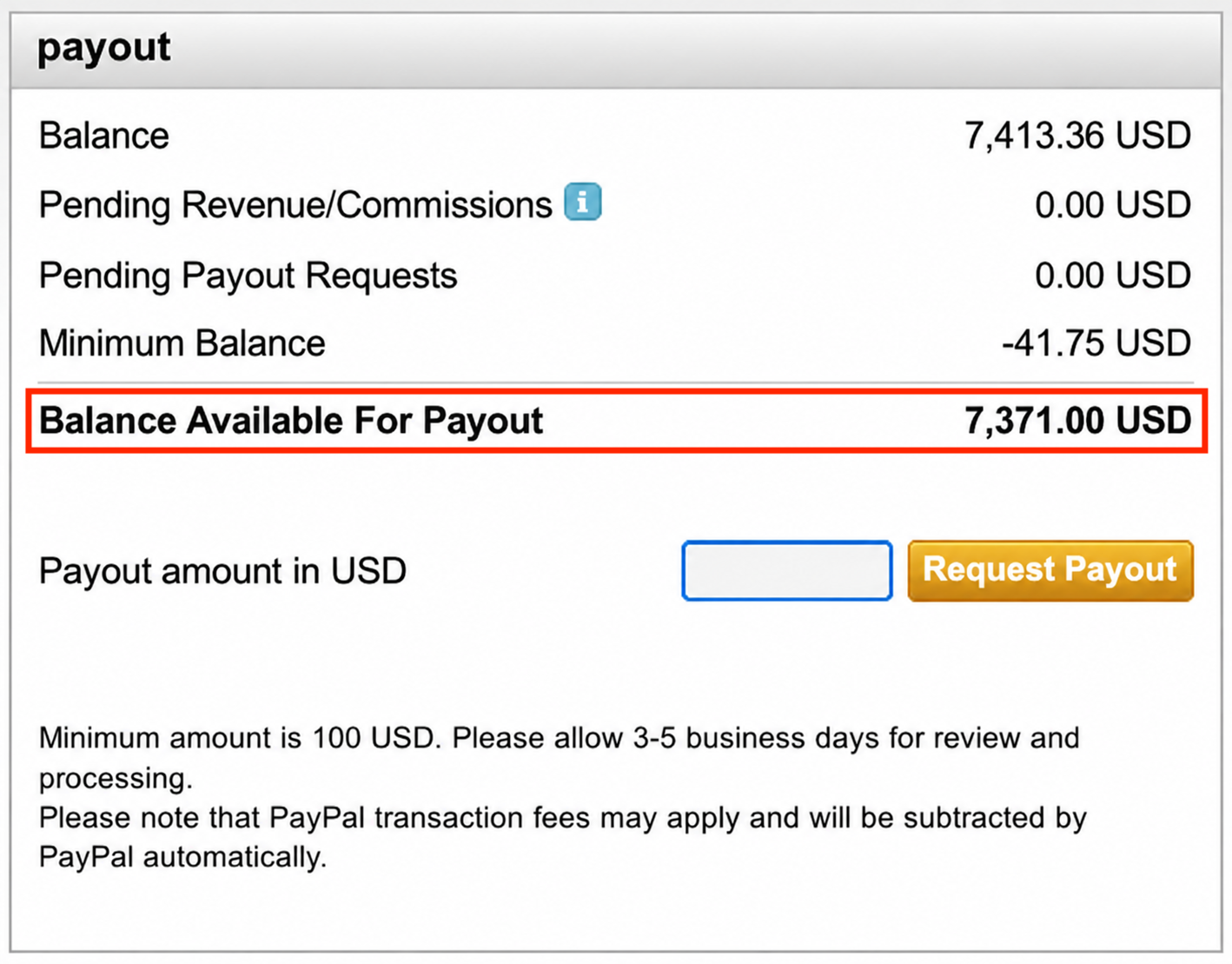
Review the Balance Available For Payout on your dashboard.
Step 3
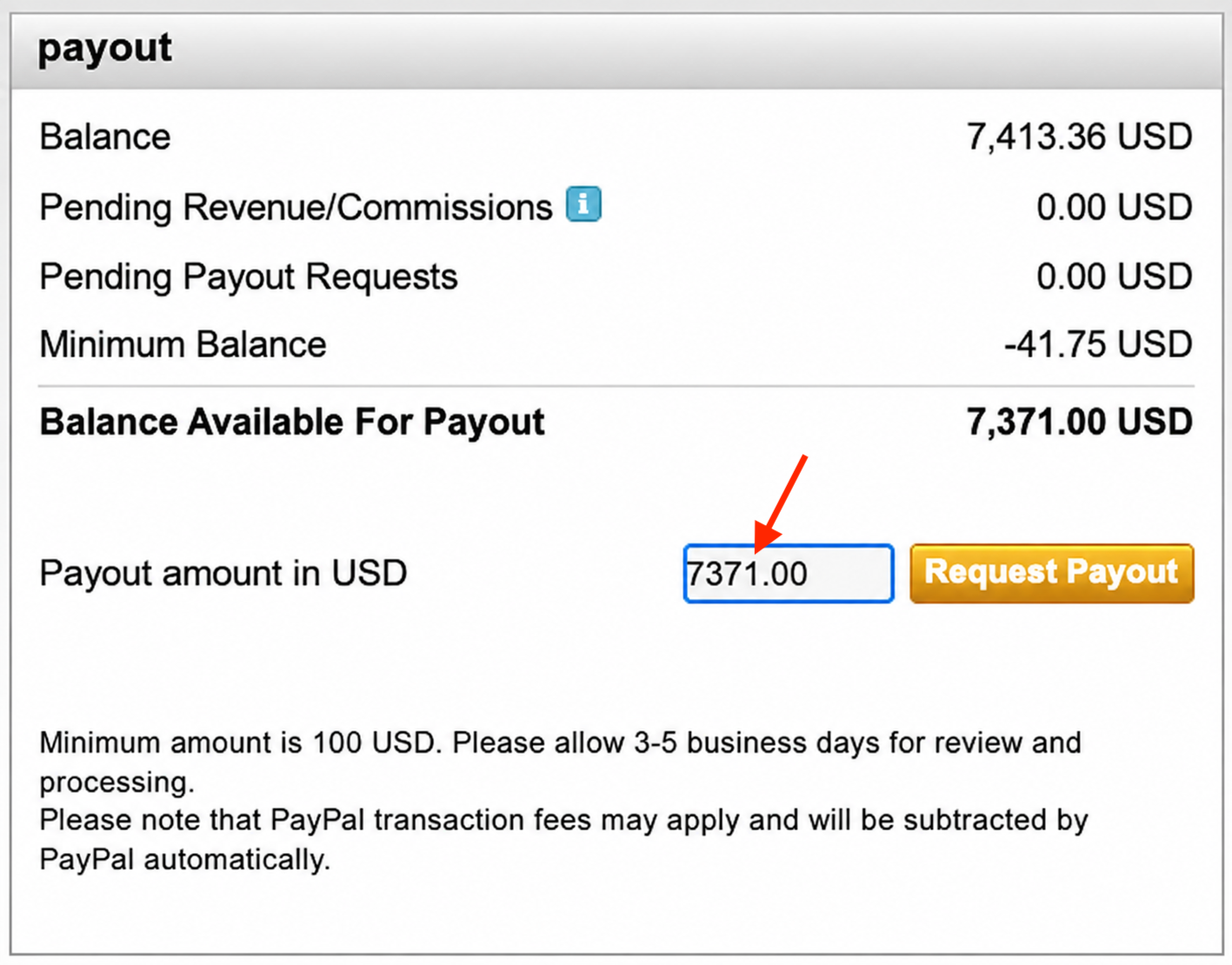
Enter the amount you would like to withdraw in Payout amount in USD, up to your available payout balance.
The minimum payout amount is $100 USD.
Step 4
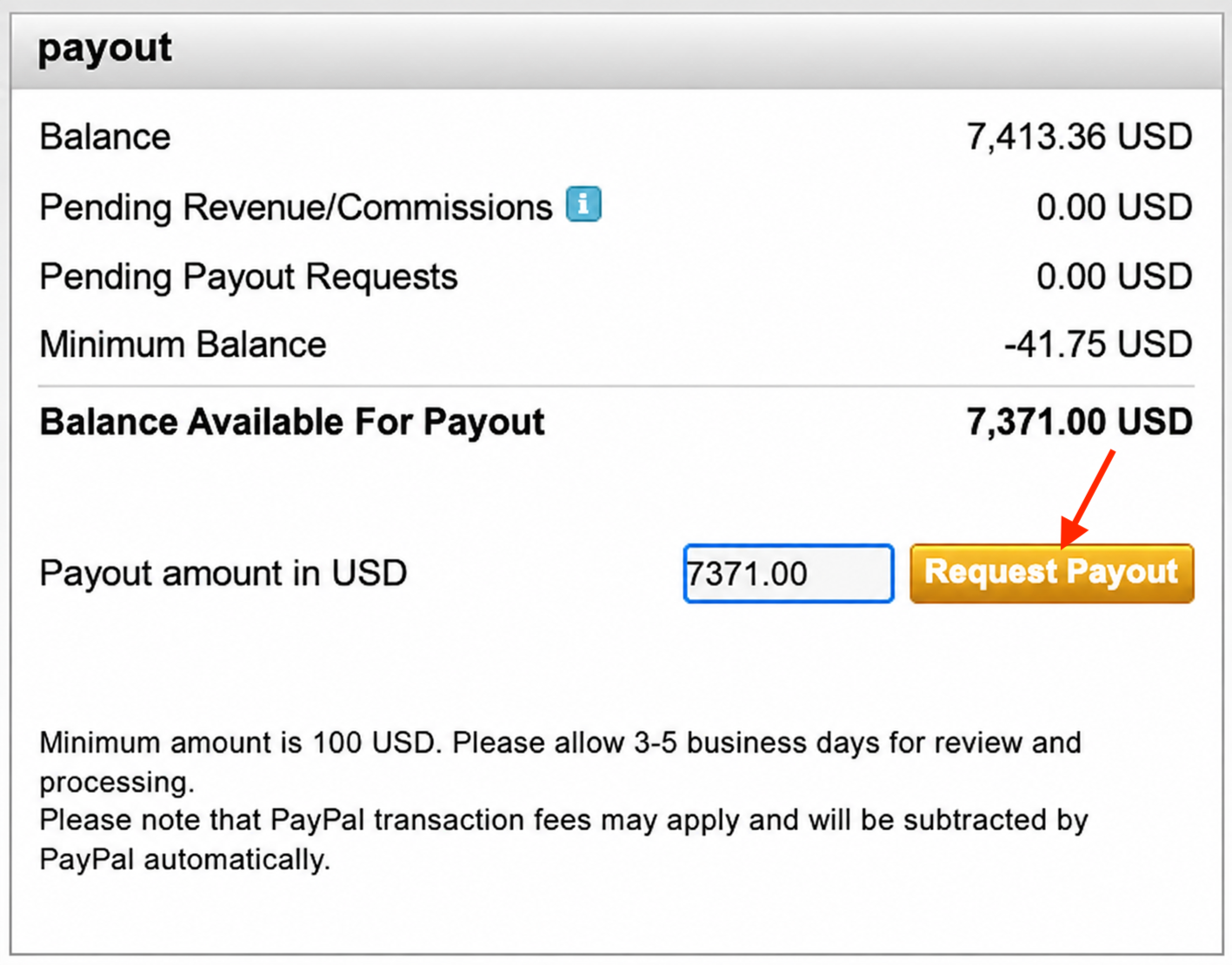
Click Request Payout to submit your payout request.
Your payout will be processed using your configured PayPal account.
Note: PayPal payouts require a PayPal account registered in the United States. Allow approximately 3–5 business days for review and processing. PayPal transaction fees may apply and are deducted automatically by PayPal.
How to request ACH payout setup
Step 1
Contact Customer Support to request ACH payout setup and confirm eligibility.
Step 2
Provide the bank, payout, or invoicing information requested by the Customer Support team.
ACH payouts are available on a quarterly basis by request.
Step 3
After ACH has been configured for your account and eligible funds are available, follow the ACH payout request process provided by Customer Support for your account.
FAQs
How much of each Pay-Per-View purchase do I receive?
With EasyPay, you receive 80% of PPV payments. Lightcast retains 20% to cover payment processing and operating costs associated with EasyPay.
Why is my available payout balance lower than my total PPV sales?
Your available payout balance may be lower because:
Some payments are still within the 30-day clearance period.
The EasyPay 80/20 revenue share has been applied.
Refunds have reduced PPV revenue.
Chargebacks have been deducted from your balance.
When does the 30-day clearance period begin?
Each successfully processed PPV payment must complete the 30-day clearance period before it becomes eligible for payout.
How long does it take to receive my payout after requesting it?
For PayPal payouts, allow approximately 3–5 business days for review and processing.
Additional processing time may depend on the payout provider.
Is there a minimum payout amount?
Yes. The minimum PayPal payout amount is $100 USD.
Contact Customer Support for information about any requirements that apply to ACH payouts.
Can I receive payouts through ACH instead of PayPal?
ACH payouts may be available on a quarterly basis by request and are subject to eligibility.
Contact Customer Support to discuss ACH payout setup and requirements for your account.
Do I need to submit a W-9 or W-8 to receive a Pay-Per-View payout?
It depends on your payout method.
For ACH payouts, U.S. publishers must provide a W-9. Foreign publishers must provide the applicable W-8 form based on their tax status.
Lightcast does not require a W-9 or W-8 solely for PayPal payouts because PayPal handles the applicable tax reporting for payments made through its platform.
Contact Customer Support if you are unsure which tax form applies to your account.
Can I receive Pay-Per-View payouts if I am located outside the United States?
Payout options depend on your location and account setup.
PayPal payouts require a PayPal account registered in the United States. If you are located outside the United States, contact Customer Support to confirm the payout options and requirements available for your account.
Who decides whether a Pay-Per-View refund is approved?
The publisher determines their own refund policy and decides whether a PPV refund request should be approved.
Lightcast’s Accounting team can issue an approved refund when written authorization is received from the publisher and the applicable revenue has not already been paid out.
If the revenue has already been paid out, the publisher is responsible for handling the refund directly with the purchaser.
What happens if a chargeback occurs after I have received my payout?
Chargebacks can occur after funds have already been paid out.
If the applicable PPV revenue has already been withdrawn, the chargeback amount is deducted from future earnings.
Where can I view information about viewers who purchased Pay-Per-View access?
Log in to www.crosstribution.com and open easypay invoices.
easypay invoices shows PPV purchaser information, paid invoices, and the amounts collected.