
How to promote your published apps
Overview
This article focuses on promotion activities outside the App Stores, such as sharing direct links, announcing your apps to your audience, encouraging downloads, and keeping your apps active with fresh content.
For information about App Store metadata, indexing, and search visibility, see Understanding App Store search visibility.
How it works
App growth usually depends on a combination of audience awareness, ongoing promotion, fresh content, viewer engagement, direct app links, and App Store visibility.
App Stores control their own search results, rankings, recommendations, categories, and featured placements. Promoting your apps can help increase awareness and downloads, but it does not guarantee search visibility, rankings, or featured placement.
Promoting your apps is typically the responsibility of your organization. Lightcast develops and publishes supported apps but does not provide ongoing app marketing services unless separately agreed upon.
After your app is published, you can share direct app links through your website, newsletters, social media, event materials, email campaigns, and other communication channels. Direct links can make promotion easier because viewers do not have to search manually in an App Store or on a device.
Ways to promote your published apps
Use direct app links whenever possible so viewers do not have to search manually in an App Store or on a device.
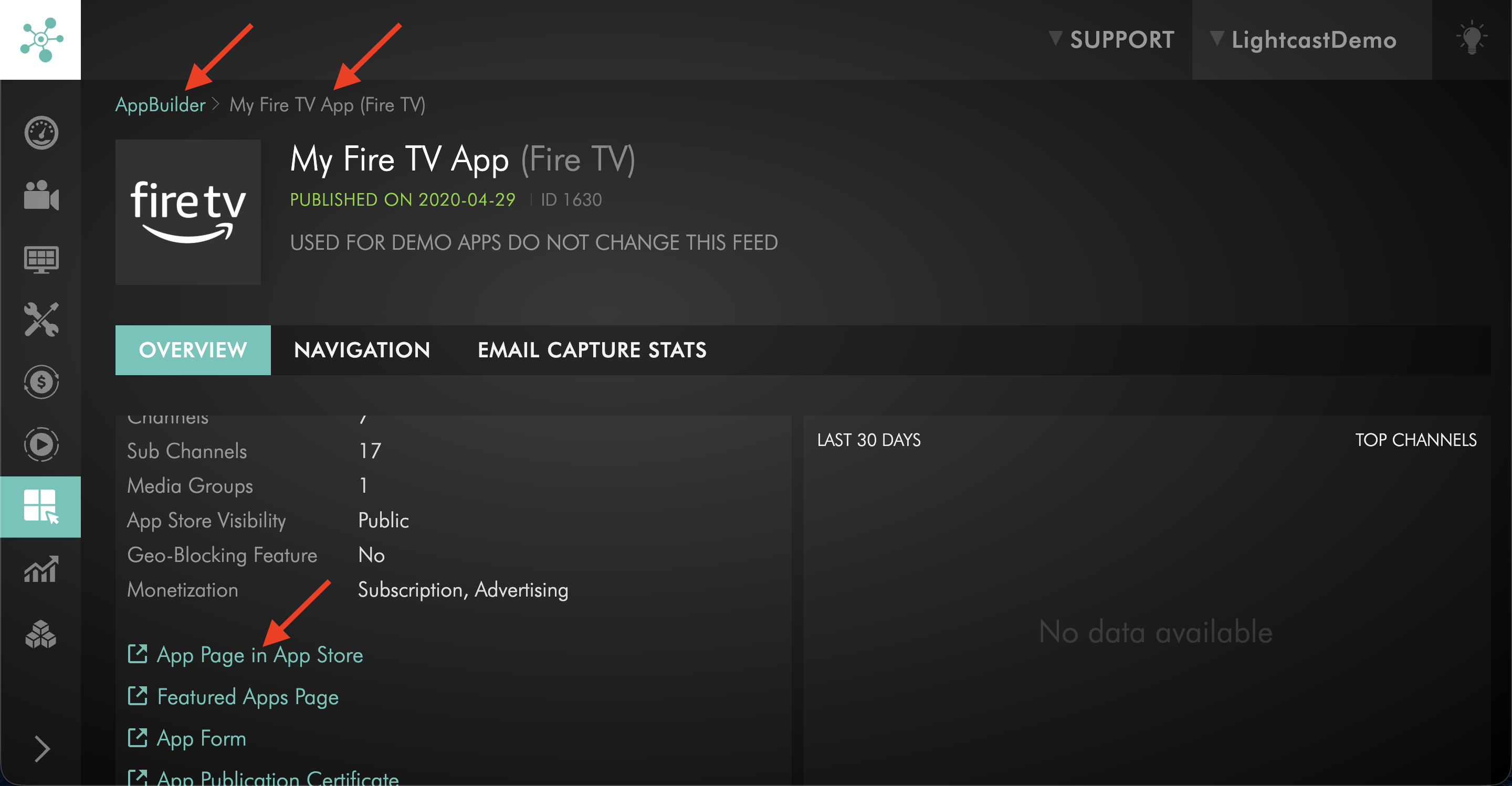
After your app is published, you can find the direct app link in the APP BUILDER section of the Media Cloud. Open the published app, then use the App Page in App Store link or the Featured Apps Page link from the app details page.
You can share app links on:
Your website
Newsletter announcements
Social media posts
Email campaigns
Email signatures
Event pages
QR codes
Partner websites or communications
Printed materials or signage
Promote apps to your existing audience
Start by promoting your apps to the audience that already follows your organization.
This may include:
Website visitors
Email subscribers
Social media followers
Donors
Customers
Members
Event attendees
Partners
Internal teams
Existing viewers from other platforms
Use clear messaging that tells viewers where the app is available, what they can watch or listen to, and why they may want to download or open the app.
Encourage downloads, ratings, and reviews
Encourage viewers to download, rate, and review your app in the App Stores where ratings and reviews are available.
Audience engagement may help support app visibility over time. However, App Stores control ranking, search placement, recommendations, and featured areas.
Keep your apps active with fresh content
Add fresh content regularly so viewers have a reason to return to your apps.
For many publishers, this may include uploading new VOD content, adding new audio content, scheduling LIVE events, or keeping existing Channels organized and up to date.
Fresh content can support long-term viewer engagement and help make app promotion more effective. For more information, see How to update your published apps with new media content.
Use QR codes for offline and event promotion
QR codes can help viewers open app links quickly from printed or in-person materials.
You can create QR codes that link to app download pages, App Store listings, Web Apps, landing pages, or other app-related pages. Many free QR code generators are available online.
QR codes may be useful on:
Event slides
Printed programs
Flyers
Posters
Signage
Booth displays
Email signatures
Website pages
Social media graphics
Review platform advertising options
Some platforms may offer paid advertising or promotional opportunities for publishers.
Availability, eligibility, pricing, and placement are controlled by each platform. Contact the platform directly or review its current advertising options if you want to explore paid promotion.
FAQs
Where can direct app links be found?
After your app is published, you can find the direct app link in the APP BUILDER section of the Media Cloud.
Open the published app, then use the App Page in App Store link or the Featured Apps Page link from the app details page.
Where should app links be shared?
Share app links on your website, newsletters, social media pages, email campaigns, email signatures, QR codes, event pages, printed materials, signage, and partner communications.
Can Lightcast promote my app for me?
Lightcast develops and publishes supported apps but does not provide ongoing app marketing services unless separately agreed upon.
Promotion is typically the responsibility of your organization.
Can Lightcast guarantee app visibility or ranking?
No. App Stores control search results, ranking, recommendations, categories, and featured placement.
Promotion can help increase awareness and engagement, but it does not guarantee App Store visibility or ranking.
Can downloads, ratings, and reviews help app visibility?
Yes. Downloads, ratings, reviews, and viewer engagement may help support app visibility over time.
However, App Stores control how apps are ranked, recommended, categorized, or featured.
Should fresh content be added after launch?
Yes. Adding fresh content gives viewers a reason to return and can support long-term audience engagement.
Fresh content may include new videos, audio files, LIVE events, or updated Channel organization.
Can QR codes be used to promote apps?
Yes. QR codes can be used to help viewers open app links from printed materials, event materials, signage, social media graphics, websites, or email signatures.
You can create QR codes using one of many free QR code generators available online.
Can paid advertising be used to promote apps?
Possibly. Some platforms offer paid advertising or promotional options.
Availability, eligibility, pricing, and placement are controlled by the platform where the advertising appears.