
Why Apple TV and iOS mobile apps may no longer appear in the App Store
Overview
This article explains why your published Apple TV or iOS mobile apps may no longer appear in the App Store and what to check first.
How it works
Apple TV and iOS mobile apps are managed through your Apple Developer Account. If there is an issue with your Apple Developer Account, Apple may remove your apps from the App Store or make them unavailable for download.
One of the most common reasons Apple apps may no longer appear in the App Store is an expired Apple Developer Program membership. If your membership expires, your Apple TV and iOS mobile apps may become unavailable until the membership is renewed.
If your Apple Developer Program membership expires, Lightcast's developers will not be able to submit new apps, submit app updates, or access certain Apple Developer resources.
Apps should still function for users who already installed or downloaded them, but new users will not be able to download the apps until the membership is renewed and Apple restores availability.
Apple sends Developer Account and membership notices to the account holder using the email address connected to the Apple Developer Account. Lightcast does not receive Apple emails about expired memberships, account issues, or required account actions.
After your Apple Developer Program membership is renewed, Apple states that apps are usually available again within 24 hours.
Instructions
Step 1
Log in to your Apple Developer Account.
Step 2
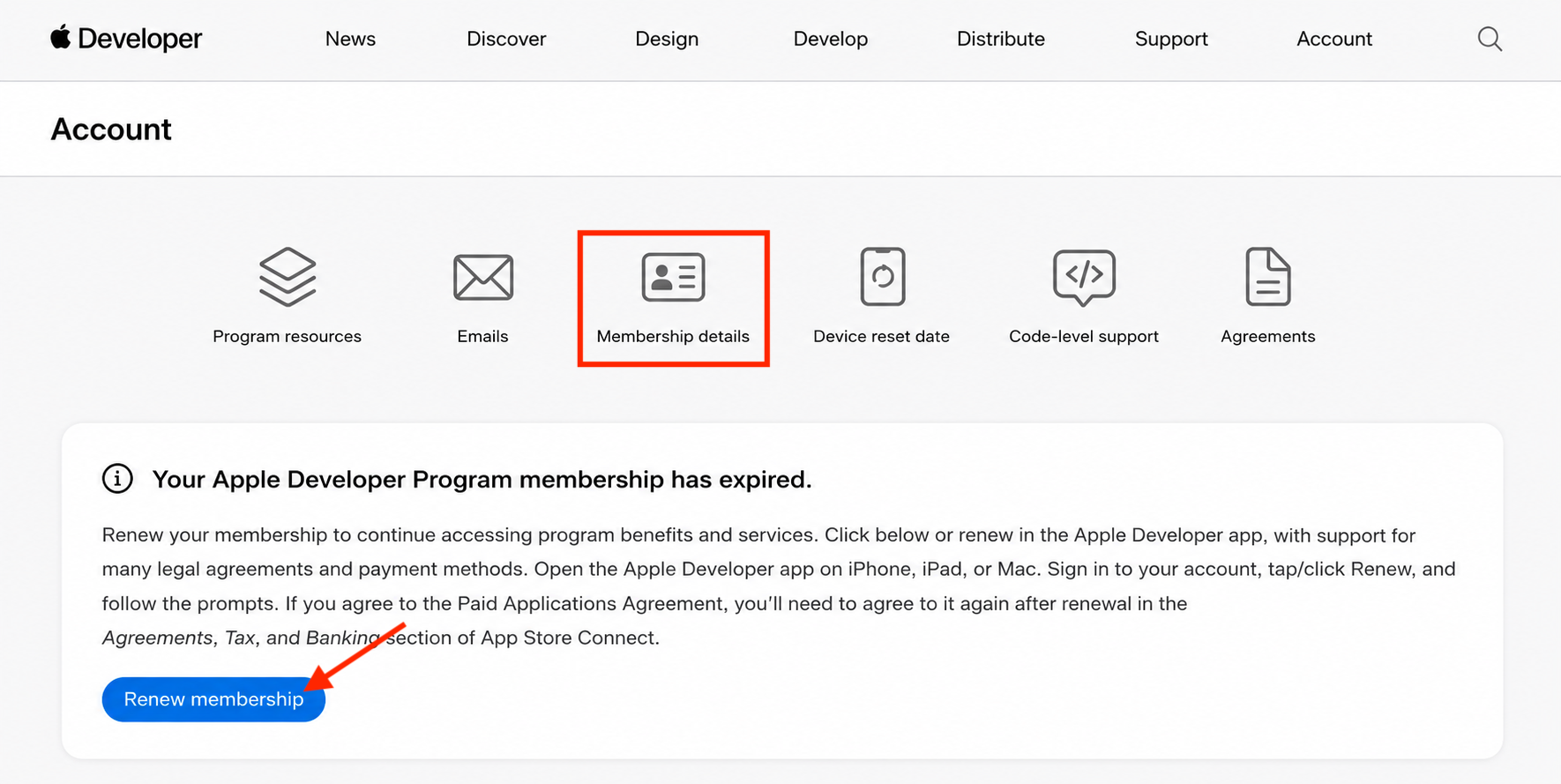
Check your Apple Developer Account for any notifications, alerts, agreements, or membership renewal prompts from Apple.
Step 3
Check the email address connected to your Apple Developer Account.
Look for emails from Apple about your app, Developer Account, membership status, agreements, billing, or required account actions.
Step 4
If your Apple Developer Program membership expired, renew the membership as soon as possible.
Step 5
To help prevent future app removal due to an expired membership, enable automatic renewal billing in your Apple Developer Account settings.
Step 6
After the membership is renewed, allow up to 24 hours for Apple to make your apps available in the App Store again.
Step 7
If your Apple TV or iOS mobile app is still not available after the renewal has processed, contact Apple Developer Support for help reviewing the account status.
FAQs
Why did the Apple TV or iOS mobile app disappear from the App Store?
There may be several reasons an Apple app is no longer available in the App Store. Start by checking your Apple Developer Account and the email address connected to that account for messages from Apple.
One common reason is an expired Apple Developer Program membership.
What happens if the Apple Developer Program membership expires?
If the Apple Developer Program membership expires, Apple may remove the Apple TV and iOS mobile apps from the App Store.
Users may not be able to download the apps until the membership is renewed.
Will the app still work for users who already downloaded it?
Yes. If your Apple Developer Program membership expires, apps should still function for users who already installed or downloaded them.
However, the apps will not be available for new downloads in the App Store until the membership is renewed and Apple restores availability.
How long does it take for apps to return after the Apple Developer membership is renewed?
Apple states that apps are usually available again within 24 hours after the Apple Developer Program membership is renewed.
Does Lightcast receive Apple Developer membership emails?
No. Lightcast does not receive Apple emails about expired memberships, billing, account notices, or required account actions.
Apple sends those emails to the Apple Developer Account holder.
How can future app removal due to expired membership be prevented?
Enable automatic renewal billing in your Apple Developer Account settings so the annual membership fee is charged automatically.
Who should be contacted if the app does not return after renewal?
Contact Apple Developer Support if the app does not return after the membership renewal has processed and 24 hours have passed.