
How to find and review your Service Subscription Agreement
Overview
This article explains how to find and review your Service Subscription Agreement (SSA) in the Media Cloud, including your Service Package, contract dates, payment cycle, Scope of Service, and any applicable Special Offers.
How it works
Your Service Subscription Agreement is available in the My Subscriptions section of the Media Cloud.
The My Subscriptions page displays the subscriptions associated with your Lightcast account, including your Service Package and any separately listed Add-Ons.
When you select your Service Package subscription, you can access:
Subscription Details: A summary of your subscription, including your subscription amount, Initial Contract Period, Start Date, Contract Renew Date, and payment information.
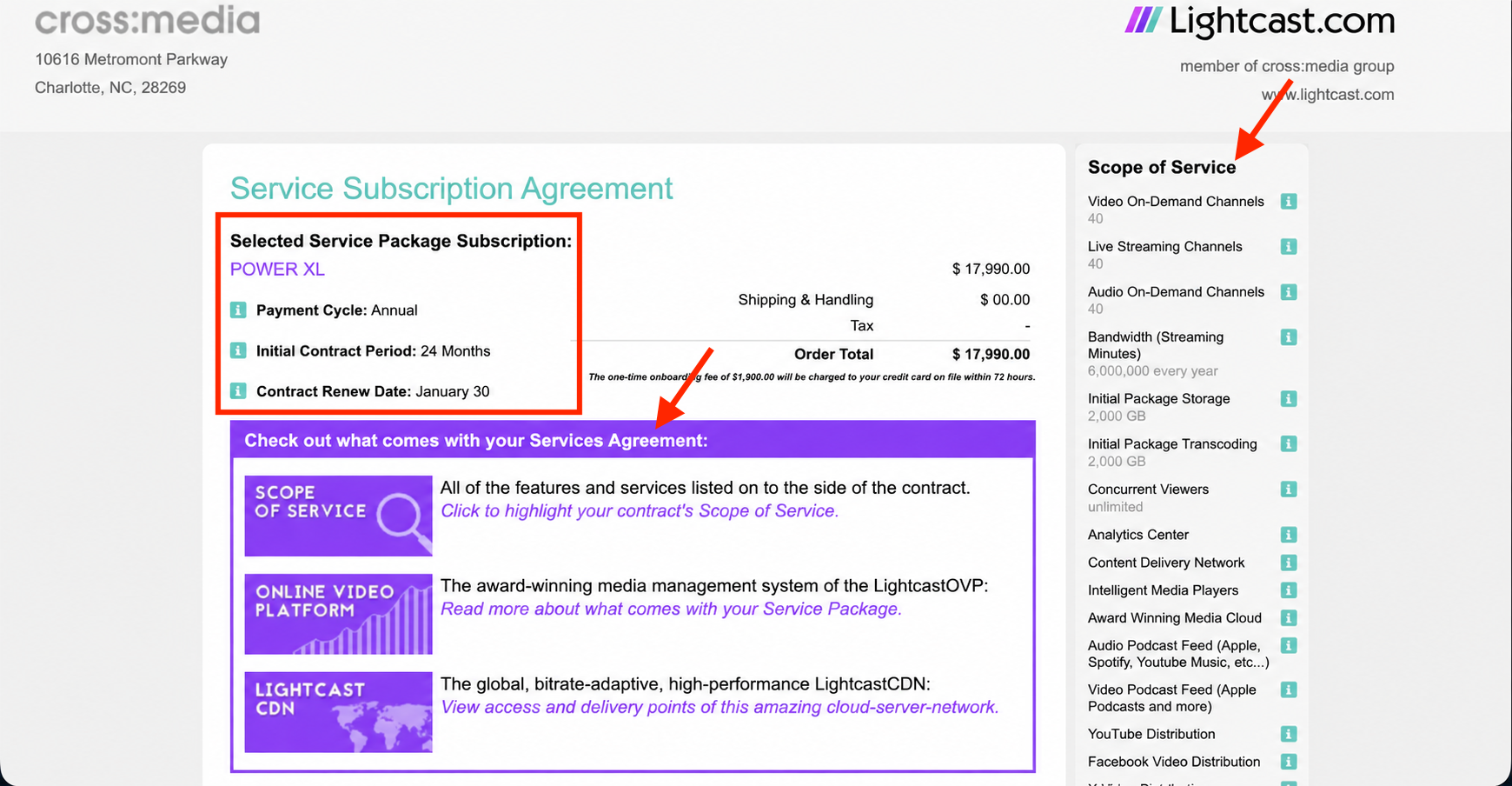
Subscription Agreement: Your full Service Subscription Agreement, including your payment cycle, contract terms, Scope of Service, and any applicable Special Offers.
The Scope of Service identifies the services, features, and allowances included with your Service Package. Any applicable Special Offers may provide additional terms or benefits specific to your subscription.
Your Contract Renewal Date indicates when your current Subscription Term is scheduled to renew. In the Media Cloud, this date is displayed as Contract Renew Date.
Important: Your Contract Renewal Date is not necessarily the deadline for requesting subscription changes. Requests for changes, such as a Service Package downgrade or cancellation, must be submitted in accordance with the terms and applicable notice requirements of your Service Subscription Agreement.
For more information, see Understanding Service Package upgrades and downgrades and Understanding subscription renewals and payment reminders.
Instructions
Step 1
Log in to your Media Cloud account.
Step 2
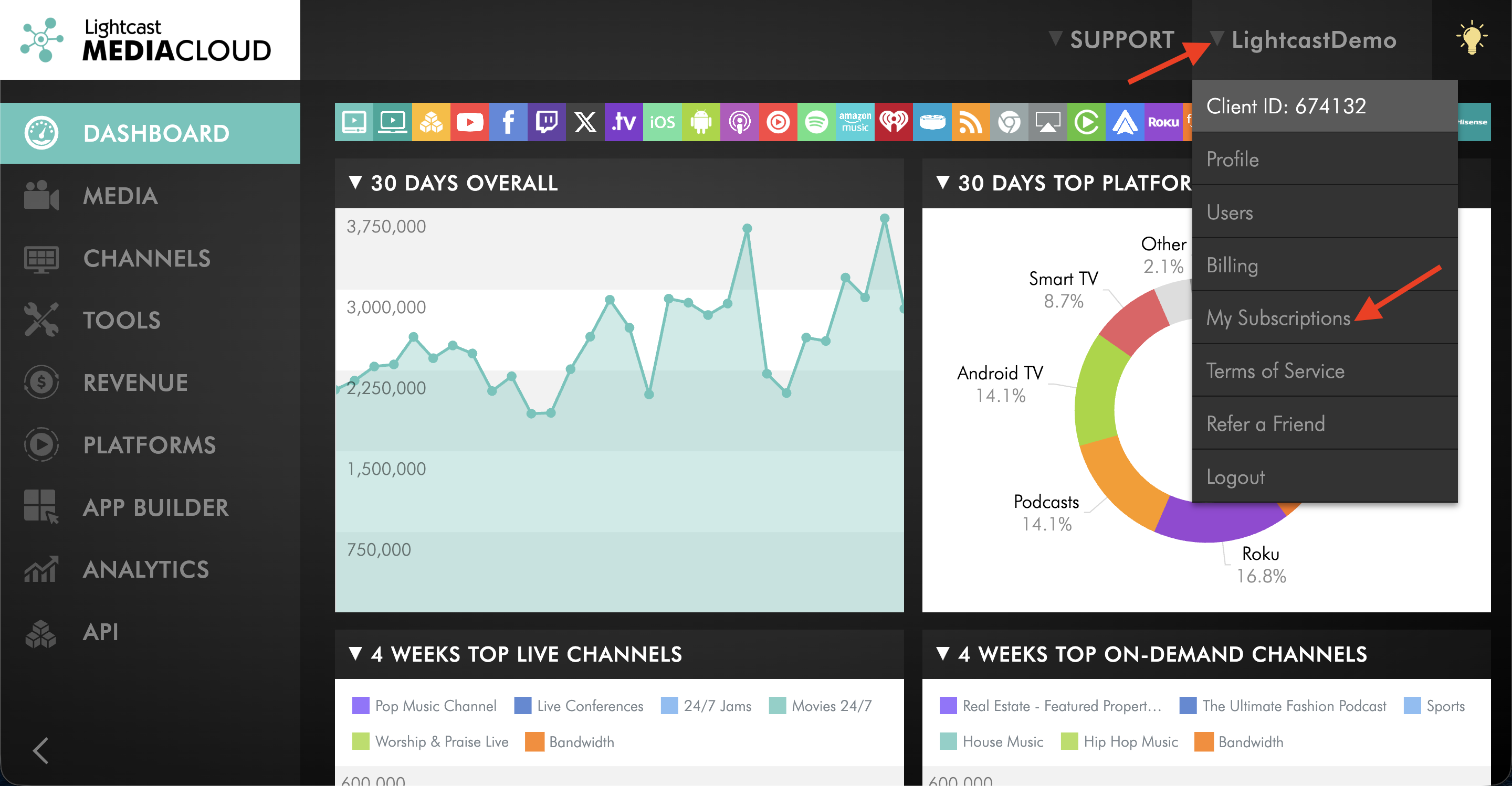
Click your username in the upper-right corner, then select My Subscriptions.
Step 3
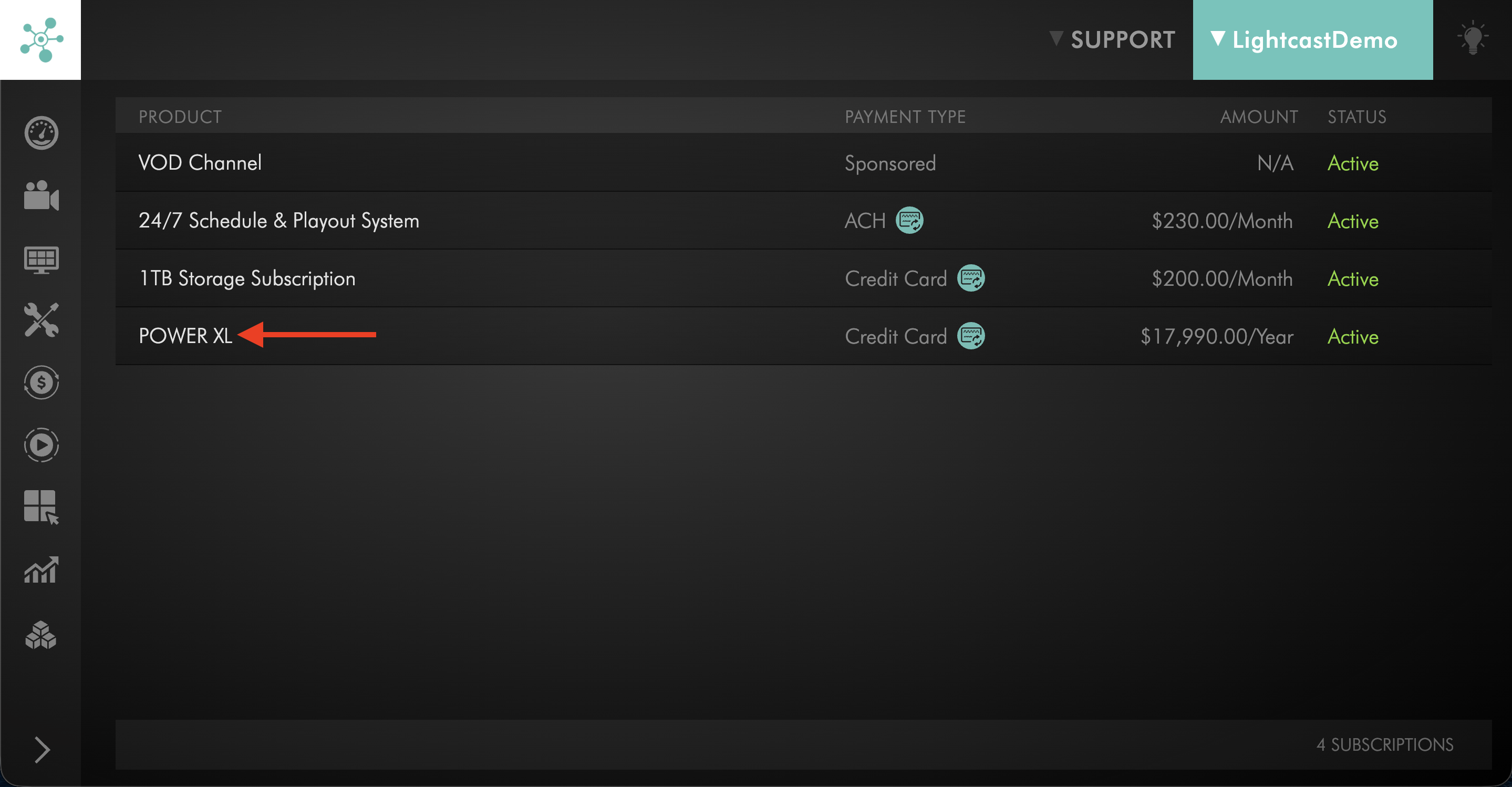
Locate and click your Lightcast Service Package subscription.
If your account includes multiple subscriptions or Add-Ons, select the Service Package you want to review.
Step 4
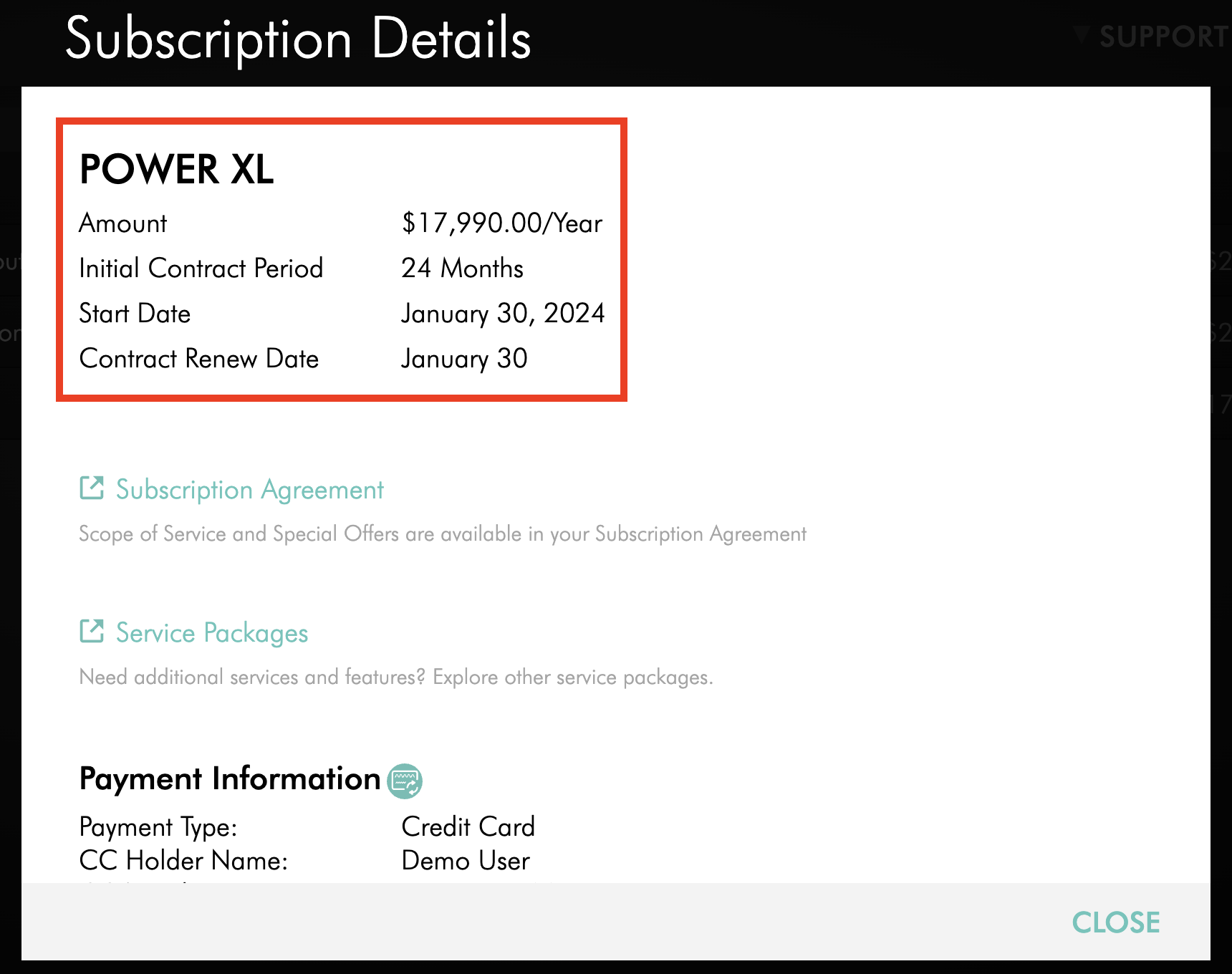
Review the Subscription Details shown for the selected Service Package.
This page can include your subscription amount, Initial Contract Period, Start Date, Contract Renew Date, and payment information.
Step 5
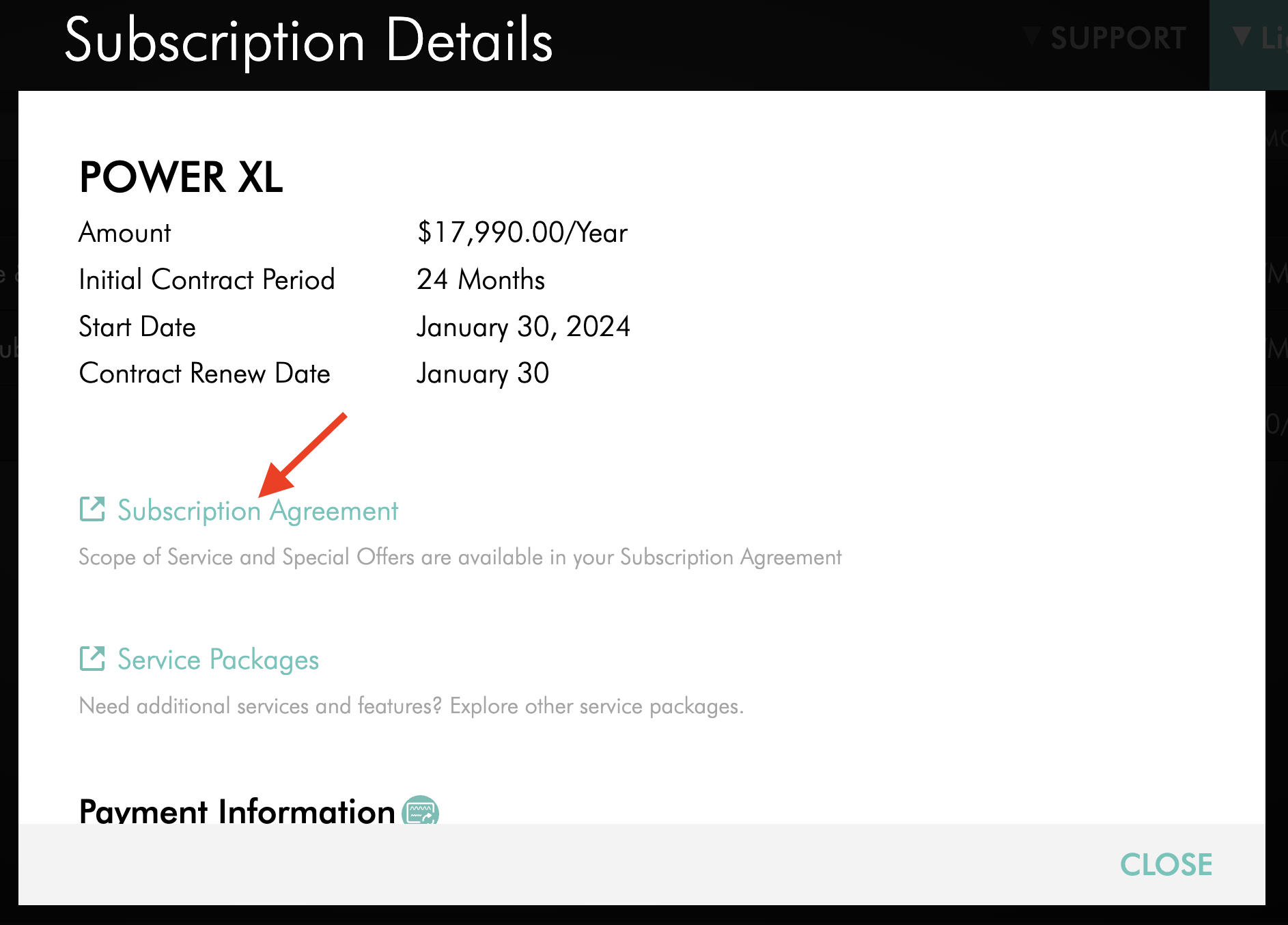
Click Subscription Agreement.
Step 6
Review your Service Subscription Agreement, including:
Your selected Service Package
Subscription amount and payment cycle
Initial Contract Period
Start Date and Contract Renewal Date
Scope of Service, including the services and allowances included with your Service Package
Any applicable Special Offers and additional contract terms
FAQs
Where can I find my Contract Renewal Date?
Go to My Subscriptions in the Media Cloud and open your Service Package subscription.
Your Contract Renewal Date is displayed as Contract Renew Date in the Subscription Details and is also included in your Service Subscription Agreement.
Why might I need my Contract Renewal Date?
Your Contract Renewal Date helps you understand when your current Subscription Term is scheduled to renew and plan for potential subscription changes.
If you are considering a Service Package downgrade or cancellation, review your Service Subscription Agreement for the applicable notice requirements and deadlines.
For more information, see Understanding Service Package upgrades and downgrades and Understanding subscription renewals and payment reminders.
What is the difference between my Initial Contract Period and my Contract Renewal Date?
Your Initial Contract Period is the original subscription commitment specified in your Service Subscription Agreement.
Your Contract Renewal Date indicates when your current Subscription Term is scheduled to renew.
Is my payment cycle the same as my Contract Period?
No. Your payment cycle determines how frequently you are billed, such as monthly, semi-annually, or annually.
Your Contract Period determines the duration of your subscription commitment.
For example, a subscription with a 24-month Contract Period may have a monthly payment cycle.
What is the Scope of Service?
The Scope of Service identifies the services and allowances included with your Service Package.
Depending on your agreement, this may include items such as Channels, Video Minutes, storage, transcoding, media delivery, Media Cloud services, and other included features.
Where can I see the payment cycle for my Service Package?
Open your Subscription Agreement from the Subscription Details page.
The Service Subscription Agreement identifies the payment cycle associated with your Service Package.
What are Special Offers in my Service Subscription Agreement?
Special Offers identify additional terms, services, or offers that apply specifically to your subscription when included in your agreement.
Review this section together with your Scope of Service when confirming what is included with your subscription.
Why do I see more than one subscription under My Subscriptions?
Your Lightcast account may include your primary Service Package along with separately listed subscriptions or Add-On services.
Select your Service Package subscription when you want to review your Service Subscription Agreement, contract dates, and core package details.