
Understanding subscription renewals and payment reminders
Overview
This article explains how subscription renewals and payment reminders work at Lightcast, including when subscriptions renew automatically, how renewal dates are determined, and when payment reminders are sent.
It also explains how payment notifications differ depending on your payment method and where to find your Contract Renewal Date in the Media Cloud.
When to use this article
Use this article when you want to:
Understand when your Lightcast subscription automatically renews.
Find out when you must submit a cancellation request to prevent renewal.
Learn whether Lightcast sends reminders before your subscription renews.
Understand when payment reminders are sent.
Learn how payment notifications differ by payment method.
Find your Contract Renewal Date in the Media Cloud.
How subscription renewals work
Your subscription schedule is determined by the original contract execution date and the renewal terms outlined in your agreement.
Your subscription is scheduled to renew automatically unless a cancellation request is submitted before the applicable 30-day renewal deadline.
If no cancellation request is received before this deadline, your subscription renews for an additional 12-month term at the existing subscription rate, unless different renewal terms or pricing have been agreed upon.
Lightcast's automated subscription billing system follows the renewal terms and payment schedule established in your agreement, helping maintain consistent billing and uninterrupted service.
Example: If your Contract Renewal Date is December 1, you must submit your cancellation request before the applicable 30-day renewal deadline to prevent automatic renewal.
For information about your Initial Contract Period and Subscription Term, see Understanding Lightcast contract durations.
How payment reminders work
Payment notifications depend on the payment method associated with your subscription.
Credit card and automatic ACH debit
If your account uses a credit card or automatic ACH debit, payments are processed automatically according to your billing schedule.
Because no manual payment action is required, Lightcast does not send advance payment reminders.
If an automatic payment attempt is unsuccessful, Lightcast sends payment failure notifications with instructions for resolving the issue.
For information about the 21-day grace period and what happens if a payment remains unresolved, see Understanding Lightcast's payment terms.
Wire transfer and manual ACH transfer
If your account uses a wire transfer or manual ACH transfer, you are responsible for initiating the payment.
To provide time to prepare for the upcoming payment, Lightcast generates the invoice approximately four weeks before the scheduled payment date and begins sending automated payment reminders at that time.
Reminders are sent approximately:
Four weeks before the scheduled payment date, when the invoice is generated
Three weeks before the scheduled payment date
Two weeks before the scheduled payment date
One week before the scheduled payment date
Important: These reminders are advance notices for an upcoming manual payment. They are not notifications that your payment is already overdue. If payment is not received by the scheduled payment date, the failed- or overdue-payment process begins.
For more information about payment deadlines, the 21-day grace period, and what happens if a payment remains unresolved, see Understanding Lightcast's payment terms.
Instructions
Follow these steps to find your Contract Renewal Date in the Media Cloud.
Step 1
Log in to your Media Cloud account.
Step 2
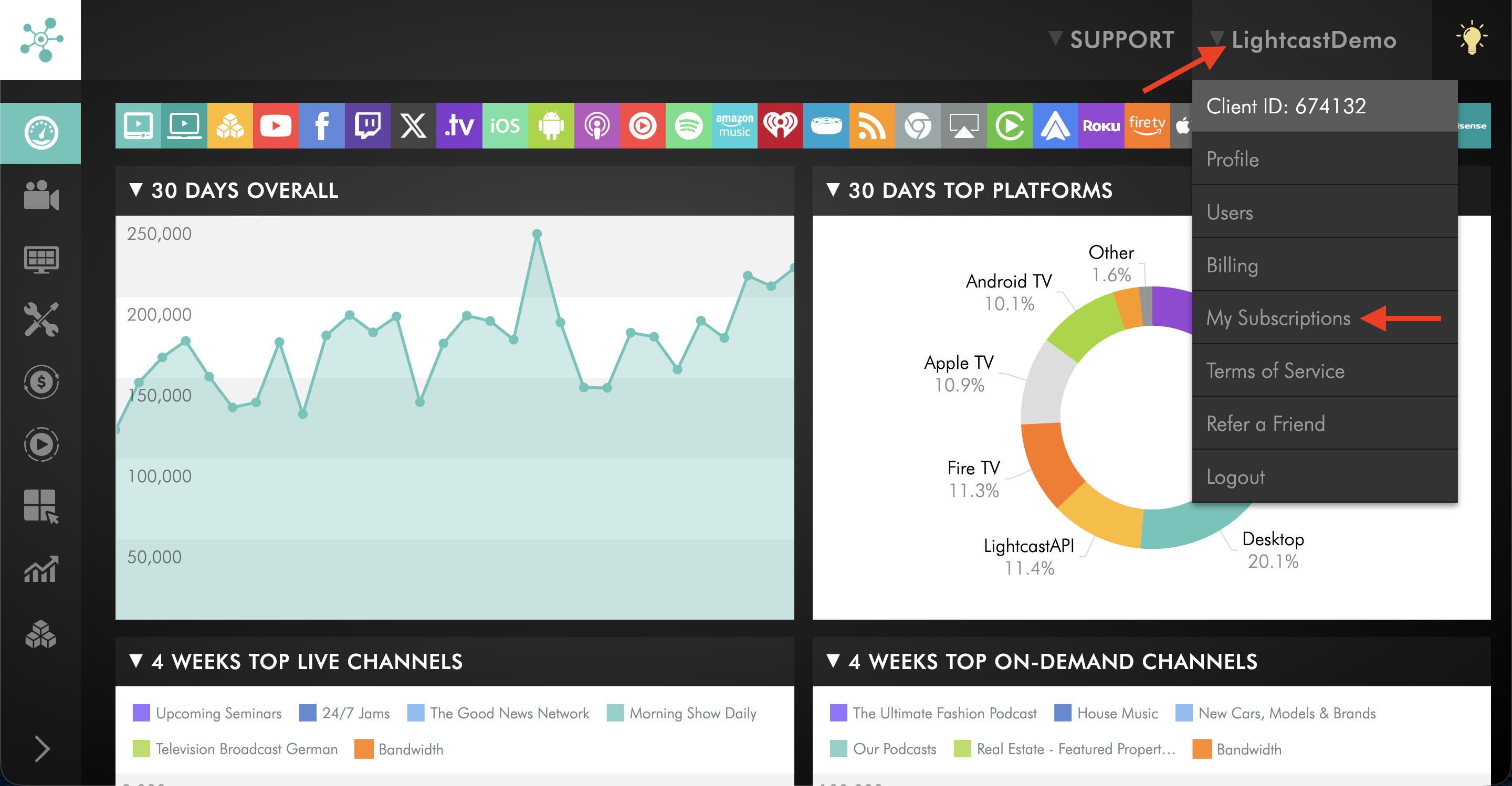
In the upper-right corner, click your username, then select My Subscriptions.
Step 3
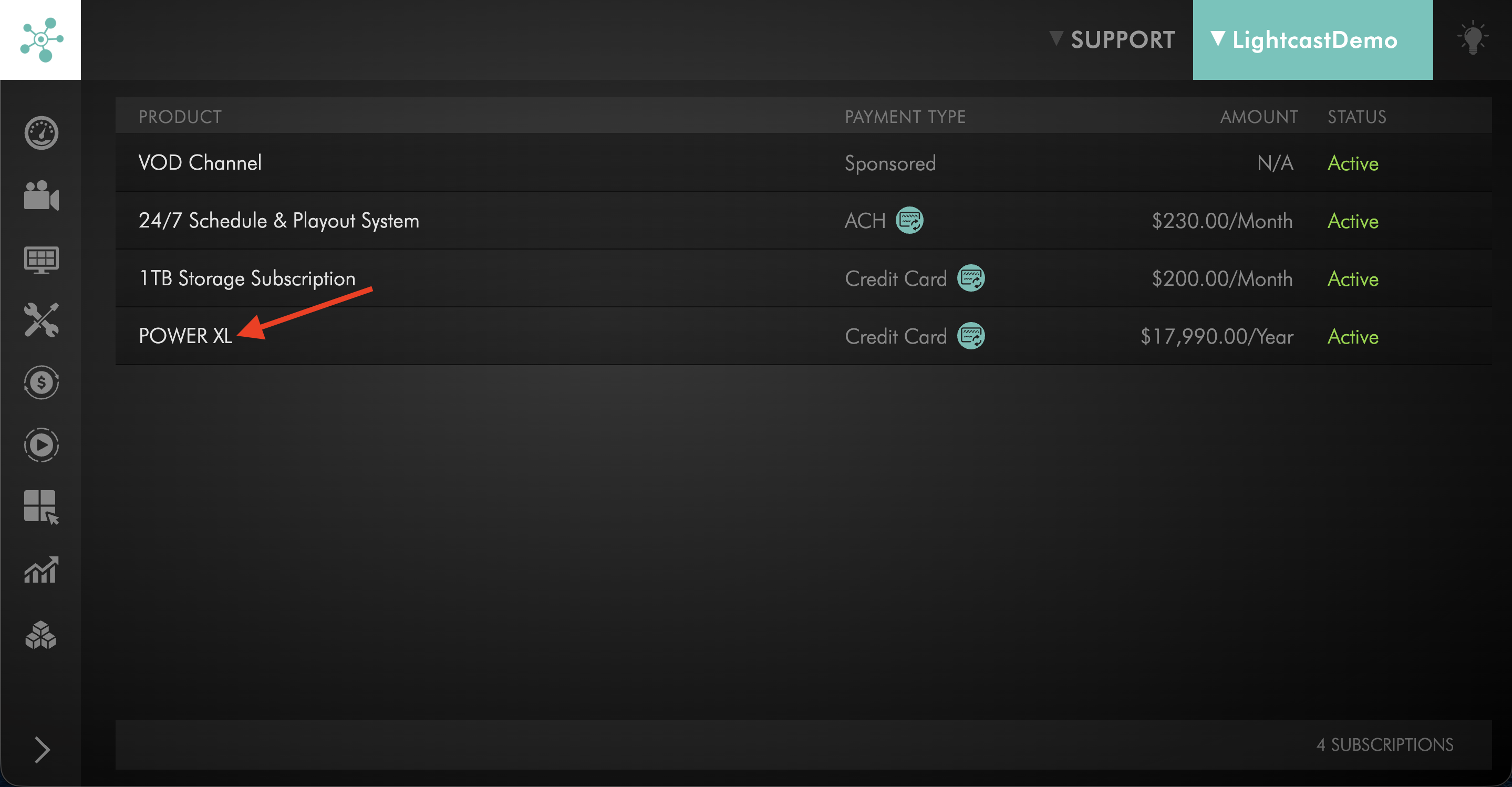
Locate your Service Package and click on it.
Step 4
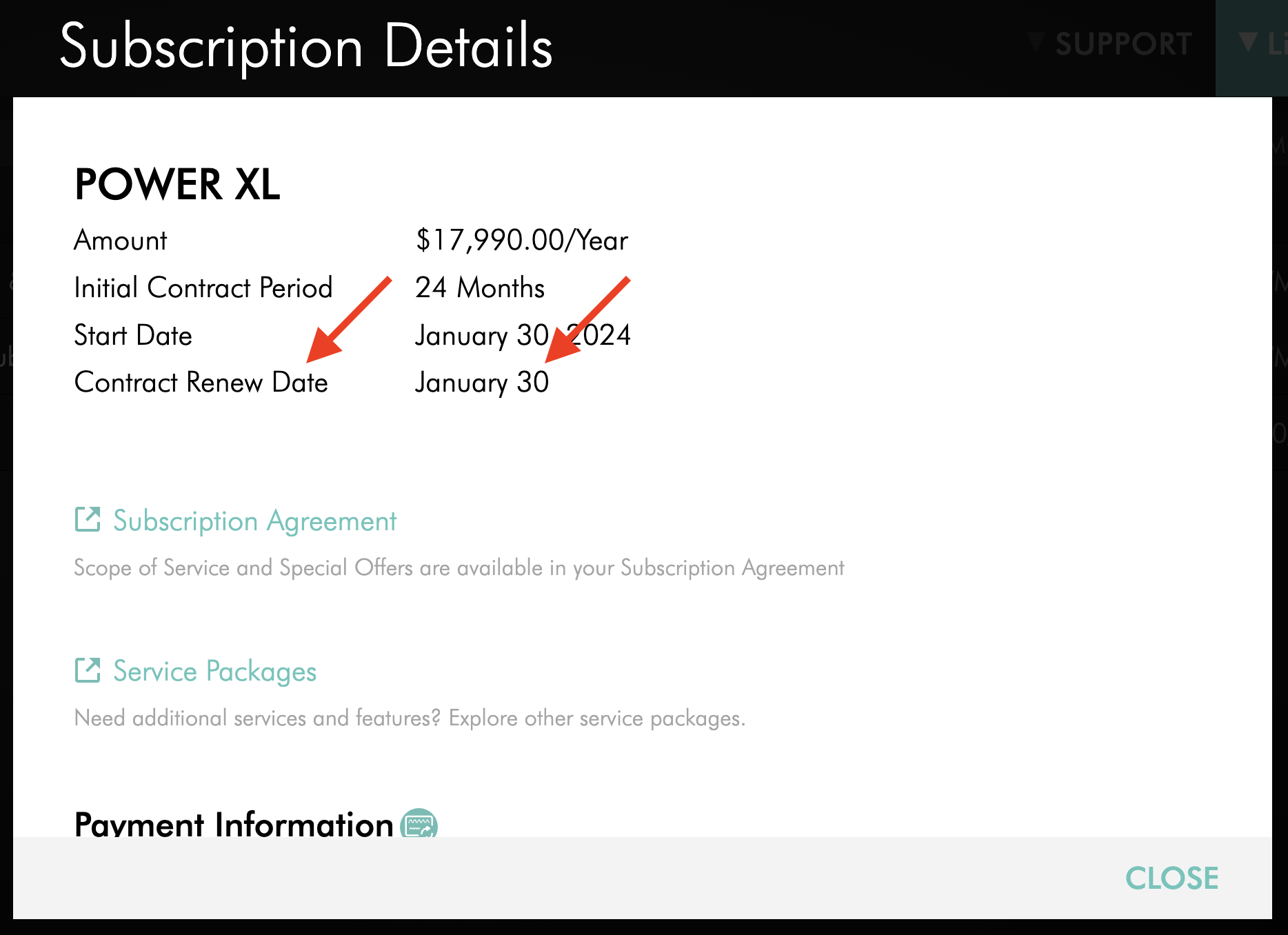
In the Subscription Details pop-up, find the Contract Renew Date, which shows your renewal date.
FAQs
Will I receive a reminder before my subscription automatically renews?
Lightcast does not typically send separate auto-renewal reminders before your Contract Renewal Date.
Your renewal schedule and cancellation deadline are established by your agreement. Payment reminders are separate from subscription renewal reminders and do not extend or change your cancellation deadline.
When are payment reminders sent?
Payment reminder timing depends on your payment method.
For credit card and automatic ACH debit, advance payment reminders are not sent because the payment is processed automatically. If the automatic payment attempt is unsuccessful, Lightcast sends payment failure notifications.
For wire transfer and manual ACH transfer, Lightcast generates the invoice approximately four weeks before the scheduled payment date and sends automated reminders approximately four, three, two, and one week before the scheduled payment date.
Why do wire transfer and manual ACH customers receive payment reminders before the invoice is generated?
Wire transfer and manual ACH payments require the customer to initiate the payment.
The advance reminder schedule gives customers time to prepare for the upcoming invoice and payment.
Are payment reminders the same as overdue-payment notifications?
No.
For wire transfer and manual ACH payments, the reminders sent before the scheduled payment date are advance notices intended to help you prepare for the upcoming payment.
If payment is not received by the scheduled payment date, the failed- or overdue-payment process begins.
For information about the 21-day grace period, see Understanding Lightcast's payment terms.
When are payment failure notifications sent?
For credit card and automatic ACH debit, payment failure notifications are sent after an automatic payment attempt is unsuccessful.
For wire transfer and manual ACH transfer, advance payment reminders are sent before the scheduled payment date. If the manual payment is not received by that date, the overdue-payment process applies.
For more information, see Understanding Lightcast's payment terms.
How long does the subscription renew for?
Paid subscriptions renew for an additional 12-month period unless a different renewal term was agreed to.
Where can I find my Contract Renewal Date?
Go to My Subscriptions in the Media Cloud and open your Service Package.
Your Contract Renewal Date is displayed as Contract Renew Date in the Subscription Details pop-up.
For more information, see How to find and review your Service Subscription Agreement.