
Viewing subscription payments and requesting payouts
Overview
This article explains where to view subscription payments, how payout timing works, and how to request a payout for subscription revenue.
How it works
Where to view invoices and subscribers
Subscription payment and subscriber information is available in your publisher portal at www.crosstribution.com.
easypay invoices shows paid invoices and the amounts collected.
easypay subscriptions shows your subscriber list and subscription status.
Payout timing
Payments are eligible for payout after a 30-day clearance period. This period allows time for cardholders to review their statements and report any unauthorized charges.
During the 30-day clearance period, payments are verified as valid, including successful credit card authorizations and completed debit card transactions.
Payout methods
PayPal payouts can be requested from your crosstribution dashboard.
Bank payouts may be available on a quarterly basis by request. Once a payout method is set, switching payout methods may not be available.
Payment processing provider
EasyPay uses CardConnect / First Data for payment processing.
Choice of payment provider
MULTIFY is Lightcast’s multi-platform subscriber system used for subscriber accounts and authentication across supported platforms where MULTIFY is integrated. EasyPay is the payment processing service used for paid subscriptions.
If you have questions about payment provider setup for your account, contact Customer Support.
Changing subscription price
Subscription price changes can be requested. Please contact Customer Support with the subscription product name and the pricing change you would like to make. Fees may apply.
Revenue distribution to content providers
If you are a content aggregator or distributor, define how revenue should be shared with your content providers before offering paid subscription or PPV content.
Common models include an equal revenue split or a performance-based revenue split. Performance-based models often use usage metrics, such as Video Minutes, to allocate payouts proportionally.
Instructions
Follow these steps to review subscription payments and request a payout.
Step 1
Log in to www.crosstribution.com using your Lightcast account credentials.
Step 2
Open EasyPay Invoices to review paid invoices and available amounts.

Step 3
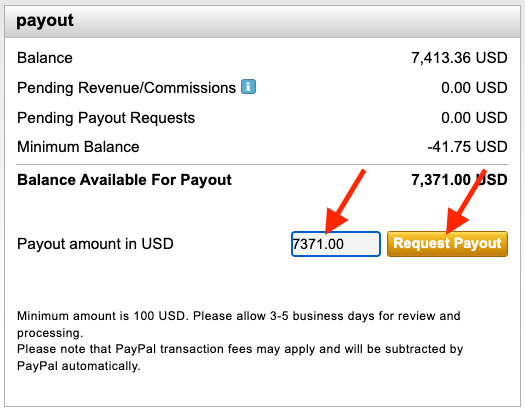
On your dashboard, enter your payout amount and click Payout to request a payout.
Step 4
Optional: To request bank payout setup, contact Customer Support. Bank payouts may be available quarterly and may require additional invoicing requirements from your team.
FAQs
Why is there a 30-day clearance period?
The 30-day clearance period allows time for cardholders to review their statements and report unauthorized charges.
During the 30-day clearance period, payments are verified as valid, including successful credit card authorizations, cleared checks, and completed debit card transactions.
Can the payout method be changed later?
In most cases, switching payout methods is not available once a payout method is set.
Can a different payment gateway be used with EasyPay?
EasyPay is integrated with the subscription payment processing workflow. Using a different payment provider requires a separate setup. If you would like to discuss payment provider options for your account, please contact Customer Support.