
How MULTIFY and EasyPay work for Subscriptions
Overview
This article explains how Lightcast’s MULTIFY authentication system and EasyPay payment processing service work together to support free and paid subscriptions. It covers subscriber accounts, payment processing options, multi-platform access, subscriber data, and subscriber management.
How it works
What is MULTIFY?
MULTIFY is Lightcast’s multi-platform user authentication system. For subscriptions, MULTIFY enables viewers to create an account, sign in, and access content associated with their subscription across supported platforms.
MULTIFY supports both free and paid subscriptions. While MULTIFY handles subscriber authentication and account-based access, EasyPay or another supported payment processor handles payment processing for paid subscriptions.
MULTIFY can be used in three common ways:
Free subscriptions ($0 subscriptions): Viewers register to create an account and access subscription content without paying a subscription fee. A per-subscriber monthly MULTIFY fee applies. For more information, see Understanding $0 subscriptions.
Paid subscriptions with EasyPay: Viewers subscribe and pay through EasyPay. A separate per-subscriber MULTIFY fee does not apply because EasyPay uses a revenue-sharing model. For more information, see How EasyPay subscription payments, invoices, and fees work.
Paid subscriptions with Stripe: Viewers subscribe and pay through Stripe when a supported integration is configured. A per-subscriber monthly MULTIFY fee applies in addition to Stripe’s payment processing fees.
Payment processing for paid subscriptions
EasyPay is Lightcast’s payment processing service for paid subscriptions.
With EasyPay:
Subscribers can purchase subscriptions using supported credit and debit cards.
Subscription payments and transaction information are recorded through the EasyPay system.
Publishers receive 80% of subscription payments, while Lightcast retains 20% to cover payment processing and operating costs associated with the EasyPay service.
A separate per-subscriber MULTIFY fee does not apply.
EasyPay is often the most cost-effective option because it uses a revenue-sharing model rather than charging a separate monthly MULTIFY fee for each subscriber.
Stripe can also be used as an alternative payment processor when a supported integration is configured. However, Stripe processing fees and a separate monthly MULTIFY fee per subscriber apply.
Contact Customer Support to discuss available payment processing options and integration requirements for your subscription service.
Subscriber data and reporting
MULTIFY provides a centralized subscriber database where publishers can view subscriber information and manage subscriber records.
Depending on your subscription setup, the subscriber database may include:
Name and email address
Sign-up date
Payment cycle and payment status
Subscription product
Invoices
Monthly and annual revenue summaries
Subscriber data can be exported in CSV format. Exports may include additional fields, such as phone number or address, depending on what information is collected during registration.
For paid subscriptions using EasyPay, publishers can also review subscription and payment information through their dedicated subscriber database account at crosstribution.com.
Account-based access across platforms
Subscription access is associated with the subscriber’s MULTIFY account rather than with an individual app or device.
Subscribers can sign in with the same account and access content included in their subscription across supported Web Apps, mobile apps, and TV apps where MULTIFY is integrated and the applicable subscription content is available.
Important: A subscription does not automatically make subscription content available across all publishing properties. The applicable subscription content must be available in each supported Web App, mobile app, or TV app where you want subscribers to access it.
Device limits and access protection
Device limits are not included in the standard subscription setup. Subscribers can use their MULTIFY account to access subscription content across supported platforms.
Lightcast offers additional content protection options, including Lightcast DRM and Geo Blocking, depending on the publisher’s Service Package and configuration.
Contact Customer Support to learn more about available content protection options and discuss any specific security requirements for your subscription content.
Embedded player URL tracking
Tracking the URL where a subscription player is embedded is not included by default.
If you need an embeddable subscription player with registration, sign-in, embed location tracking, and registration source URL tracking, this requires custom development.
Contact Customer Support to discuss the best approach for your use case.
Subscriber email communication
Lightcast recommends using your own email marketing tool or CRM to send subscriber communications, such as welcome emails, new content announcements, and updates.
Before using exported subscriber contacts for marketing or newsletter communication, make sure subscribers have opted in or are given an option to opt out. This helps you manage subscriber communication through your own email system and stay aligned with your own communication policies.
EasyPay may send transactional confirmations related to subscription or payment activity. For custom welcome emails or ongoing subscriber communication, use your own email marketing tool or CRM.
Instructions
Follow these steps to export subscriber data and use it for subscriber communications.
Step 1
Log in to www.crosstribution.com using your Lightcast account credentials.
Step 2
Open easypay subscriptions or easypay invoices.

Step 3
Optional: Apply the Payment Type and Frequency filters you want to use and click Update.

Step 4
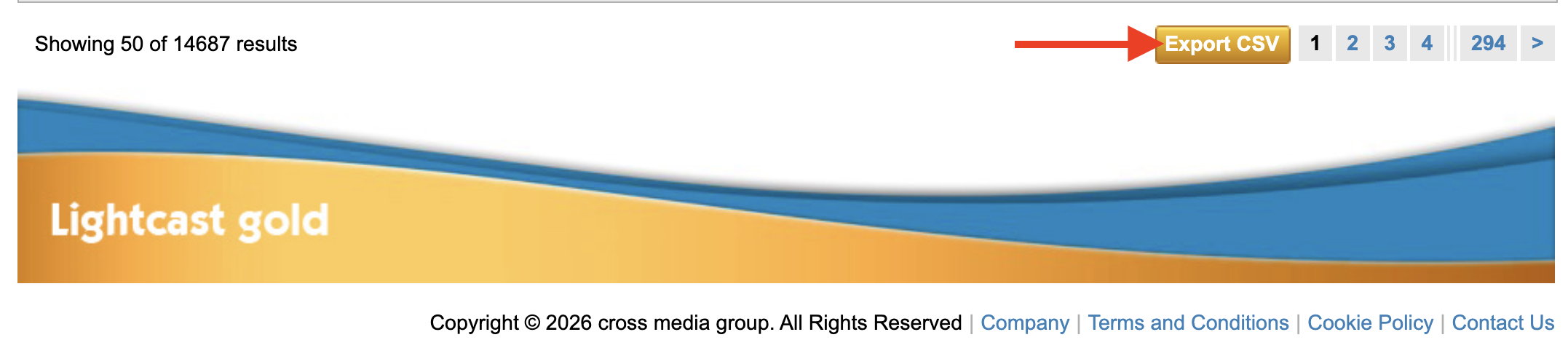
Scroll down and click Export CSV.
Step 5
To email subscribers, import the exported subscriber names and email addresses into your email marketing tool or CRM, such as Mailchimp, Constant Contact, or HubSpot.
Step 6
Send subscriber communications directly from your email platform or CRM.
FAQs
What is the difference between MULTIFY and EasyPay?
MULTIFY is Lightcast’s multi-platform user authentication system. It manages subscriber accounts and account-based access to subscription content.
EasyPay is Lightcast’s payment processing service for paid subscriptions.
Can MULTIFY be used for free subscriptions?
Yes. MULTIFY supports free subscriptions, allowing viewers to register and access content without paying a subscription fee.
A per-subscriber monthly MULTIFY fee applies.
For more information, see Understanding $0 subscriptions.
Can subscribers use the same account across multiple apps?
Yes. Subscribers can sign in with the same MULTIFY account across supported Web Apps, mobile apps, and TV apps where MULTIFY is integrated and the applicable subscription content is available.
Can a publisher use a payment processor other than EasyPay?
Yes. Stripe can be used as an alternative payment processor when a supported integration is configured.
A per-subscriber monthly MULTIFY fee applies in addition to Stripe’s payment processing fees.
Contact Customer Support to discuss available payment processing options and integration requirements.
Are device limits included with MULTIFY?
No. Device limits are not included in the standard subscription setup.
Contact Customer Support to discuss specific security requirements and available content protection options.
Can subscriber data be exported?
Yes. Subscriber data can be exported in CSV format. Available information depends on the subscription setup and the information collected during registration.
For instructions on exporting EasyPay subscriber data, see the Instructions section above.
Can publishers send emails to their subscribers?
Yes. Lightcast recommends using your own email marketing platform or CRM for custom welcome emails, content announcements, newsletters, and other subscriber communications.
Subscriber contact information can be exported from your subscriber database for use in your email marketing platform or CRM.