
Optimize Before You Upload
🎥 Compress Smart, Stream Strong:
Use optimized export and codec settings from your editing suite or compression software. We recommend the H.264 codec (MPEG-4 AVC) - it's widely supported, delivers great quality at lower bitrates, and is easy to export from most editing software.
💾 Why It Matters:
Reducing bitrate, resolution, compression rate, and frame rate can significantly cut down your file size without sacrificing viewer experience. The trick is finding the right balance for your content type.
🔍 The Big Four - Compression Factors to Balance:
When exporting your files, balance the following:
Resolution
Bitrate
Compression rate
Frame Rate
👉🏼 Click here to view our recommended export settings.
Recommended Bitrate Settings & Resolutions
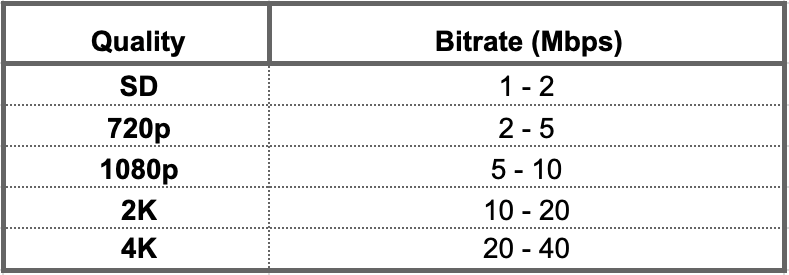
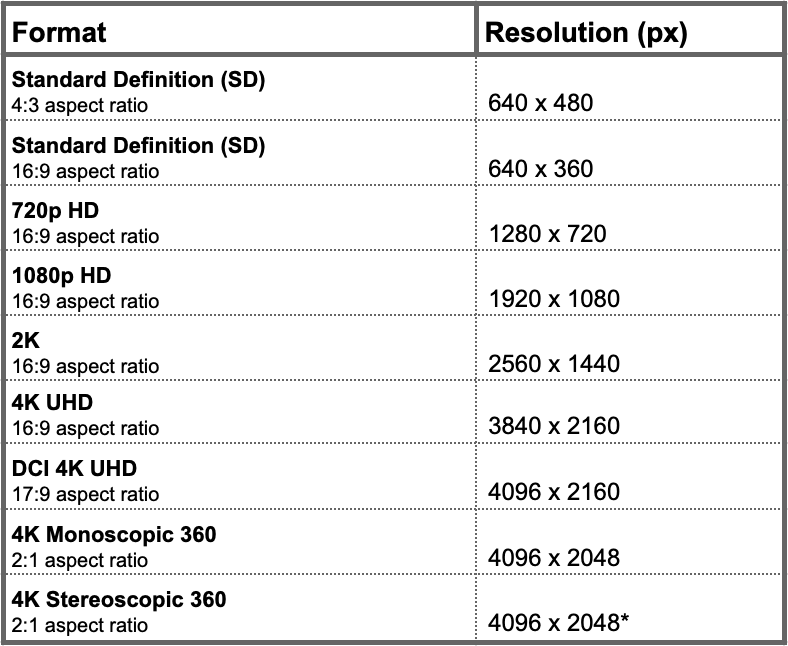
*Stereoscopic video should be uploaded with the left and right views stacked on top of each other as 4096 x 1024 (4:1 aspect ratio) for each eye.

For previous tips, visit our tips page!
Would you like a specific topic to be covered by an upcoming “Tip of the Week”? Click here to submit your request!
Happy Streaming!
Your Lightcast Success Team