
Master Your Exports
When it comes to both VOD and live streams, four key factors affect quality and file size: compression rate, resolution, bitrate, and frame rate. The goal is to find the best balance between these values to achieve high-quality video at the lowest possible file size.
💾 Codec Recommendations
H.264 is a widely supported standard that delivers high visual quality while keeping file sizes efficient. It's a great starting point for encoding your videos, helping you maximize your upload quota while minimizing upload and conversion times. For best results, select the "Baseline" or "Main Profile" H.264 setting.
💡 Frame Rate: Keep It Consistent
We recommend maintaining your video's native frame rate when compressing. Always choose a constant frame rate rather than a variable one to ensure smooth playback throughout the entire video.
📊 Balance Quality & File Size
Bitrate controls your video's quality and file size. For VOD, use a variable bitrate and adjust as needed–lower rates shrink files, higher rates preserve quality. For live streams, bitrate also affects the data sent from your encoder to the CDN.
🌐 The Bandwidth Factor
Remember: file size (for VOD) and bitrate (for LIVE) don't just impact storage and transcoding–they also determine bandwidth consumption every time your viewers watch. Larger files or higher bitrate mean more data usage per stream, which adds up quickly across audiences and can increase your bandwidth costs.
👉 Click here to see how bandwidth usage is calculated
Recommended Resolution Settings
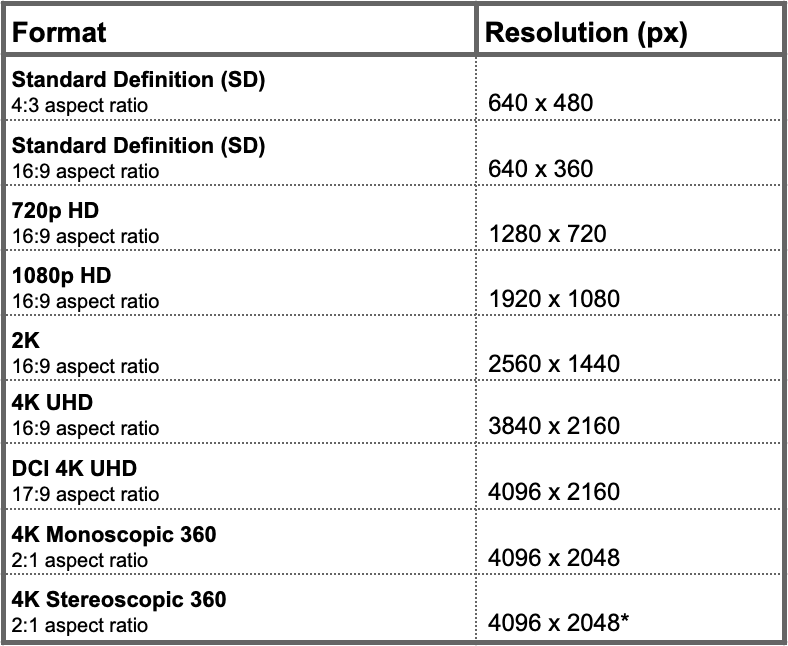
*Stereoscopic video should be uploaded with the left and right views stacked on top of each other as 4096 x 1024 (4:1 aspect ratio) for each eye.

For previous tips, visit our tips page!
Would you like a specific topic to be covered by an upcoming “Tip of the Week”? Click here to submit your request!
Happy Streaming!
Your Lightcast Success Team