
Organize Your Apps with Channel Group Rows
AOD and VOD Channel Group Rows make it easier for viewers to discover content by organizing multiple AOD and VOD Channels into labeled, horizontal rows. Customize each row to match your content strategy and create a more engaging experience across your Web Apps, mobile apps, and TV apps.
🍿 What Are VOD and AOD Channel Group Rows?
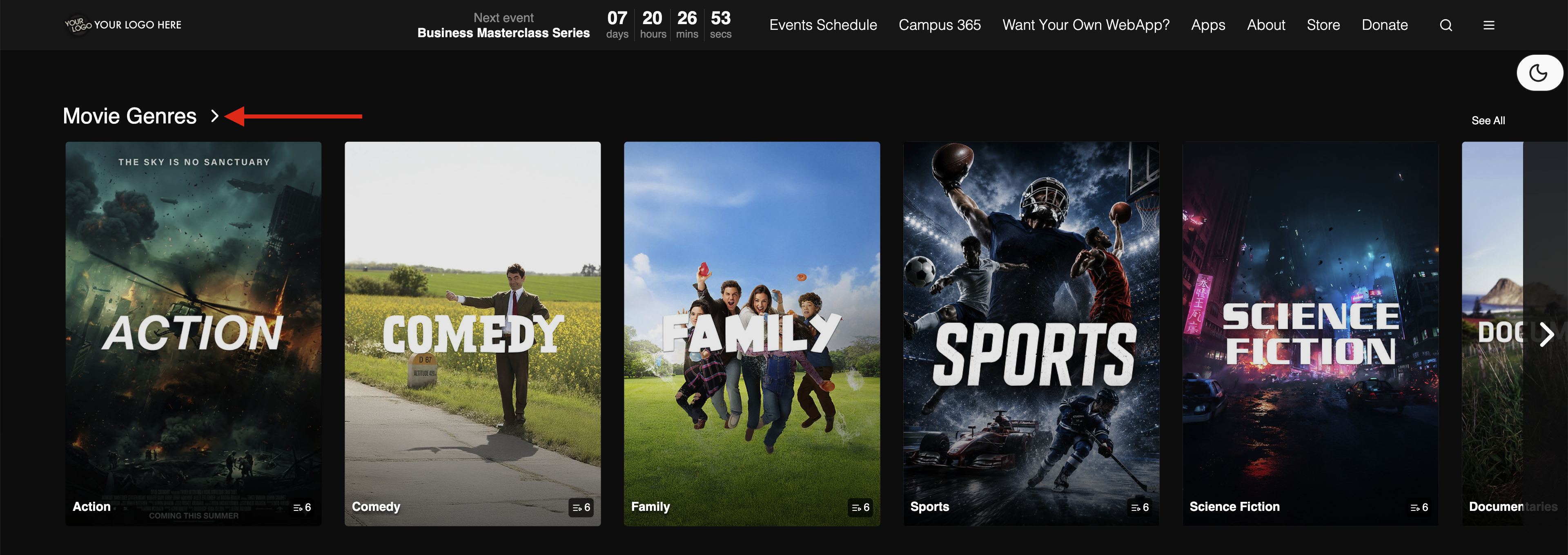
An AOD or VOD Channel Group Row is a horizontal collection of AOD or VOD Channels displayed under a custom category or title, similar to the browsing rows found on popular streaming platforms.
You can:
Choose which AOD or VOD Channels to include
Customize custom row titles (such as Top Picks, Movie Genres, or Ministry Programs)
Control where each row appears within your app
✨ Why Use Channel Group Rows?
AOD and VOD Channel Group Rows help you:
Organize large content libraries into easy-to-browse categories
Improve discovery by making related content easier to find
Increase engagement by showcasing featured content in a visually appealing layout
Pro Tip: Keep your apps feeling fresh by updating Channel Group Rows to feature seasonal content, new releases, special events, or trending series.
🚀 Ready to Get Started?
Interested in adding AOD or VOD Channel Group Rows to your apps? Contact Customer Support to learn more about enabling this feature and creating a more dynamic viewing experience.
Click the Image Below to See an Example of a VOD Channel Group Row on a Web App
For previous tips, visit our tips page!
Would you like a specific topic to be covered by an upcoming “Tip of the Week”? Click here to submit your request!

Happy Streaming!
Your Lightcast Success Team