
Lightcast.com Release Notes for April 2017
We are excited to announce the release of many great features, improvements and products.
For previous release notes, visit our release page: https://help.lightcast.com/en/categories/1873217-release-notes
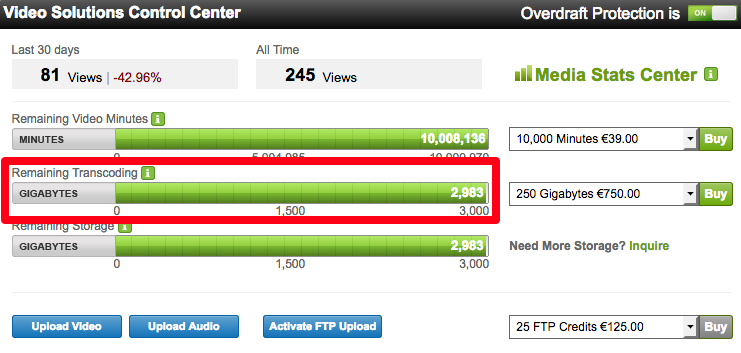
Transcoding Bar Displayed in all Lightcast Accounts
Previously only part of larger accounts, now everyone can see their transcoding at one glance, and can easily add storage and transcoding to existing packages as needed. The balance bars are a great way to track your usage and to notify you when your account is close to zero. Additional e-mail notifications were set up to alert you should your account reach a critical level of remaining storage and transcoding usage.
Default Placeholder Filler Videos for 24/7 Scheduled Channels
Two new default placeholder filler videos have been added to our 24/7 scheduler. These videos are automatically used if there is a gap in the schedule that is too small for your selected filler videos to bridge. This is to ensure that the 24/7 scheduled streams don’t go black for more than 5 seconds, even if you haven’t scheduled a gap, or you don’t have a suitable filler video assigned. For gaps of 5 seconds or longer, a lovely video stating “Our Broadcast Will Continue Shortly with the Next Scheduled Program” will be displayed. For gaps under 5 seconds, a simple black screen will be displayed.

The scheduling of the default placeholder videos has also been added to the LightcastAPI for situations where a request is made for the current 24/7 schedule including filler content.
Pay-Per-View for Web Player
We’ve improved our Pay-Per-View system for the Lightcast web player. If viewers have purchased a pay-per-view and return to the page before the start date/time, they will see a screen confirming their purchase with a message of “Come Back Soon to Watch the Live Stream”. If viewers go to a pay-per-view channel and all pay-per-views have already ended, they are given the following message: “There are currently no upcoming pay-per-views. Please check back with us soon.”
Lightcast Web Player Upgrade
The Lightcast web player has been upgraded to the latest player technology, adding even more features to the player and fixing a couple of issues for HLS support. Here is a quick overview of whats new:
Fixing issues for HLS support in HTML5 environments and HLS streams on desktop devices
The updated web player (former Player 2) replaced Lightcast Player 1, which was removed from the embed code options. If you have Player 1 embedded, it is automatically replaced with the updated web player, except for legacy devices and browsers
The updated Lightcast player is now also fully compatible with Internet Explorer 10.
Improvements for Chromecast / Google Cast, making it more stable when casting content to your TV Screen
Support for Apple AirPlay has been added
On the Live Channel Player, we renamed the player button “Playlist” with “Events” to better describe what a viewer will see when the button is clicked
Upgraded the player embed code to allow multiple bitrate channels and DRM Level 1 support on Mobile Video Websites (a feature included in selected packages)
Some cosmetic changes and improvements to the dock buttons has been made for a better viewer experience
Publisher Address Feature
Lightcast EasyPay Clients can now manage and update their Publisher Address easily within their Lightcast client account under “Account - Profile”. When you change the Publisher Address, an email notification will be sent out to the account owner, confirming the changes.
Adding New Fire TV Images
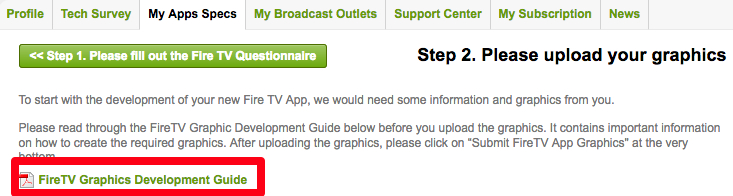
Amazon added two new images to their SDKs, which gives Fire TV publishers more options to market and create an unique user experience for their Apps. The new images have been added to the Fire TV app specs forms. If you already have a Fire TV app published and you would like to send us graphics for those new images, please reply to this email.
We also added a Fire TV development guide to the Fire TV app specs form to make it more easy for publishers to develop their graphics as required by the platform.
Credit Card Change Feature
For increased security, we added new entry fields and selections to the credit card change feature under “Invoices”.
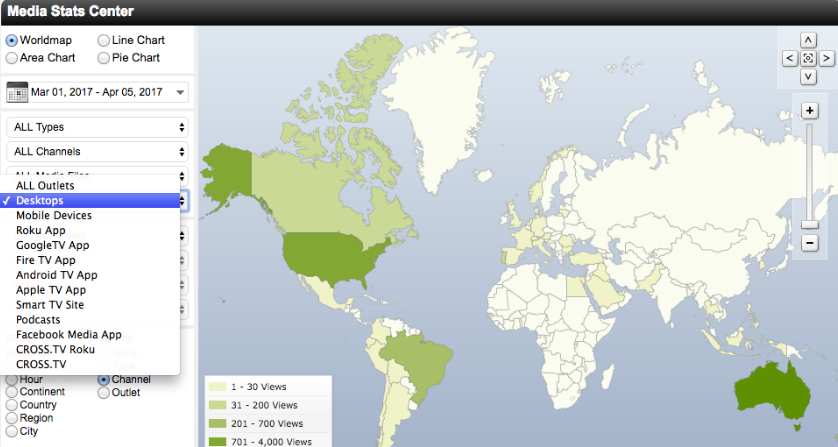
Media Stats Change
The Media Stats Category “Desktops” now better reflects the nature of devices displayed in this stats category.
Featured ConnectedTV Channel of the Month:
ACCTV - We Love Good TV - Roku Channel
We are curators of good stories. Stories about hope, life and the things God is up to in the world. We want to inspire everyone with the life-transforming good news of Jesus through engaging television. We love good TV.
Lightcast also welcomes the following clients with their recently launched Roku, Android TV, Fire TV and Apple TV Apps: CelebrationTV, Truth For Life - Alistair Begg, World Wrestling Network, Radiant TV, Breath of Life TV, MaxNow.tv, IDNR-TV, Prophetic Ministries Today, SafeTV-4U2, LoveIsrael.org.