
Metadata on Autopilot
Say goodbye to manual metadata entry! Let the Media Cloud's AI Metadata Creator do the work!
📝 Every time you upload a video or audio file, the Media Cloud's AI will:
Analyze your file during upload
Automatically generate a full transcription
Create closed captions in the original language
Compose and suggest metadata for you
✨ The following metadata is generated automatically:
✅ Title
✅ Description
✅ Keywords
✅ Language
✅ Genre
✅ Rating
🔧 Set It and Forget It – or Customize
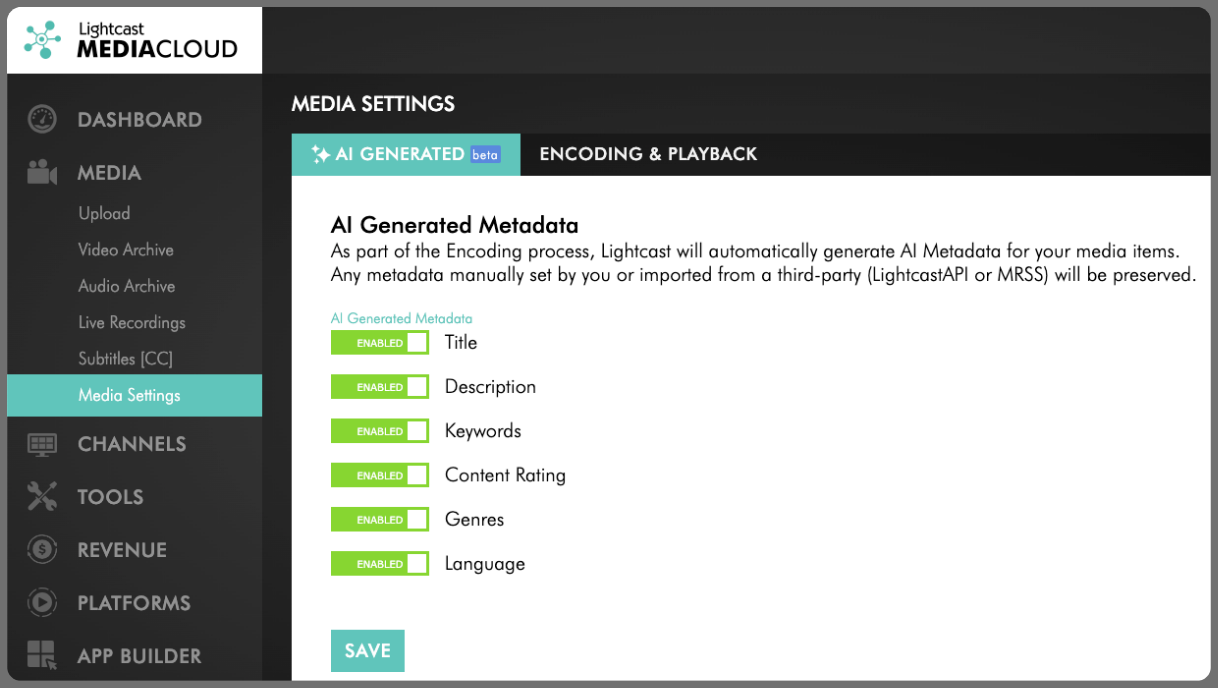
Head to your Media Settings to control which fields AI should auto-fill for newly uploaded or encoded media.
By default, all metadata fields are enabled, but you can toggle off any you prefer to handle manually.
Note: Metadata entered manually or imported (via LightcastAPI or MRSS) will not be altered by AI. You're always in control.
🎯 Want AI metadata for just one item?
No problem! Open the media file, go to the Metadata tab, and click "Generate Metadata via AI".
Pro Tip: Look for the purple AI Icon next to a field to see what's been auto-generated.
For previous tips, visit our tips page!
Would you like a specific topic to be covered by an upcoming “Tip of the Week”? Click here to submit your request!

Happy Streaming!
Your Lightcast Success Team