
First Steps Checklist
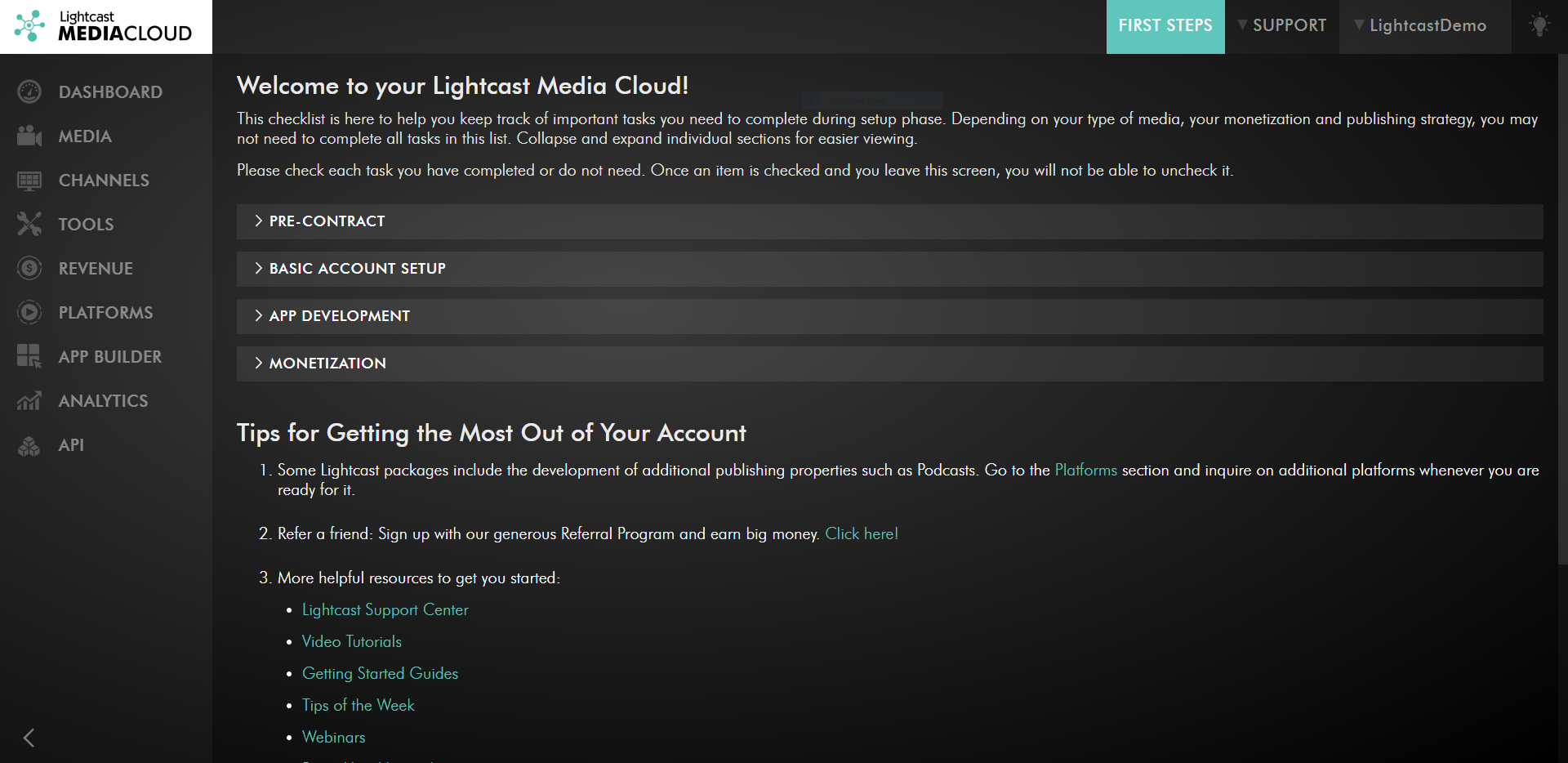
The First Steps Checklist is a recently implemented feature of the Media Cloud to help you keep track of the important tasks that you need to complete during the setup phase. Using the First Steps Checklist, you can easily find all of the following information:
✅ All tasks completed pre-contract.
✅ Setting up your Media Cloud account.
✅ Information and tasks needed for our development team to start developing your apps.
✅ Information about the Media Cloud's monetization tools.
✅ Links to helpful resources such as: the Lightcast Help Center, Video Tutorials, previous Tips of the Week, and more!
👉You can find the First Steps Checklist in the “SUPPORT” menu under “First Steps”.
👉For new clients, during the first 60 days, we also display the First Steps Checklist as a top-level link in the top menu bar (see Screenshot below), as well as instead of the Dashboard during the first 7 days.
👉 The direct link to the First Steps Checklist is: https://mediacloud.lightcast.com/first-steps. Please make sure you are logged in to your Media Cloud account.
What the First Steps Checklist Looks Like:

For previous tips, visit our tips page!
Would you like a specific topic to be covered by an upcoming “Tip of the Week”? Click here to submit your request!
Happy Streaming!
Your Lightcast Success Team